




If you’ve ever tried scrolling through TikTok only to be greeted with endless buffering or a blank screen, we totally get you. TikTok not loading videos is a common issue, and it can happen to anyone, even if you’re on a fast Wi-Fi connection or stable mobile data. While it can be frustrating, most of the causes are easy to fix.
Here’s a detailed look at what might be going wrong and how to get your feed back up and running.
TikTok Not Loading Videos: Potential Reasons
When TikTok videos fail to load, the cause can be anywhere from a simple connectivity hiccup to a more complex app or device issue. Understanding what might be going wrong can make troubleshooting faster.
Reason #1. Weak or Unstable Internet Connection
Even if your phone shows full bars or a fast Wi-Fi symbol, connection quality can fluctuate. TikTok requires a steady stream of data to load videos, and interruptions can lead to buffering or blank screens. Users in crowded public networks, for instance, may experience slower playback during peak hours.
Reason #2. Outdated App Version
TikTok regularly releases updates to fix bugs, improve performance, and maintain compatibility with mobile operating systems. Running an older version may prevent videos from loading correctly or cause crashes on certain devices.
Reason #3. Corrupted Cache or App Data
Over time, TikTok stores temporary files to speed up performance. However, if cache files become corrupted, they can block video playback or slow down the app. This issue is common on devices that haven’t had a cache cleared in months.
Reason #4. Device or System Glitches
Sometimes the problem isn’t TikTok but the device itself. Smartphones with low memory or too many apps running in the background may struggle to load high-resolution videos. Even simple temporary glitches in the operating system can interfere with playback.
Reason #5. TikTok Server Problems
Occasionally, videos won’t load because the issue is on TikTok’s side. Outages or server maintenance can disrupt video delivery for users in specific regions or worldwide. Tools like Downdetector often report these disruptions in real time.
Reason #6. VPN or Network Restrictions
Using a VPN, proxy, or certain firewalls can interfere with TikTok’s connection, preventing videos from loading. Some users try VPNs to access content from other countries, but this can unintentionally slow down or block playback.
Now that we know why it may occur, let’s see how the issue can be solved.
How to Fix the TikTok Not Loading Videos Issue
Check Your Internet Connection
A weak or unstable connection is the most common reason videos fail to load. Even if other apps seem fine, TikTok demands a steady stream of data.
Start by switching between Wi-Fi and mobile data. Sometimes, Wi-Fi networks can have temporary glitches, and mobile data may provide a smoother experience. If your connection still seems slow, try restarting your router or checking if other devices on the same network are using heavy bandwidth, like streaming or large downloads.
Clear the TikTok Cache
TikTok stores temporary data to make the app run faster, but this cache can occasionally cause problems. Clearing it is simple and often effective.
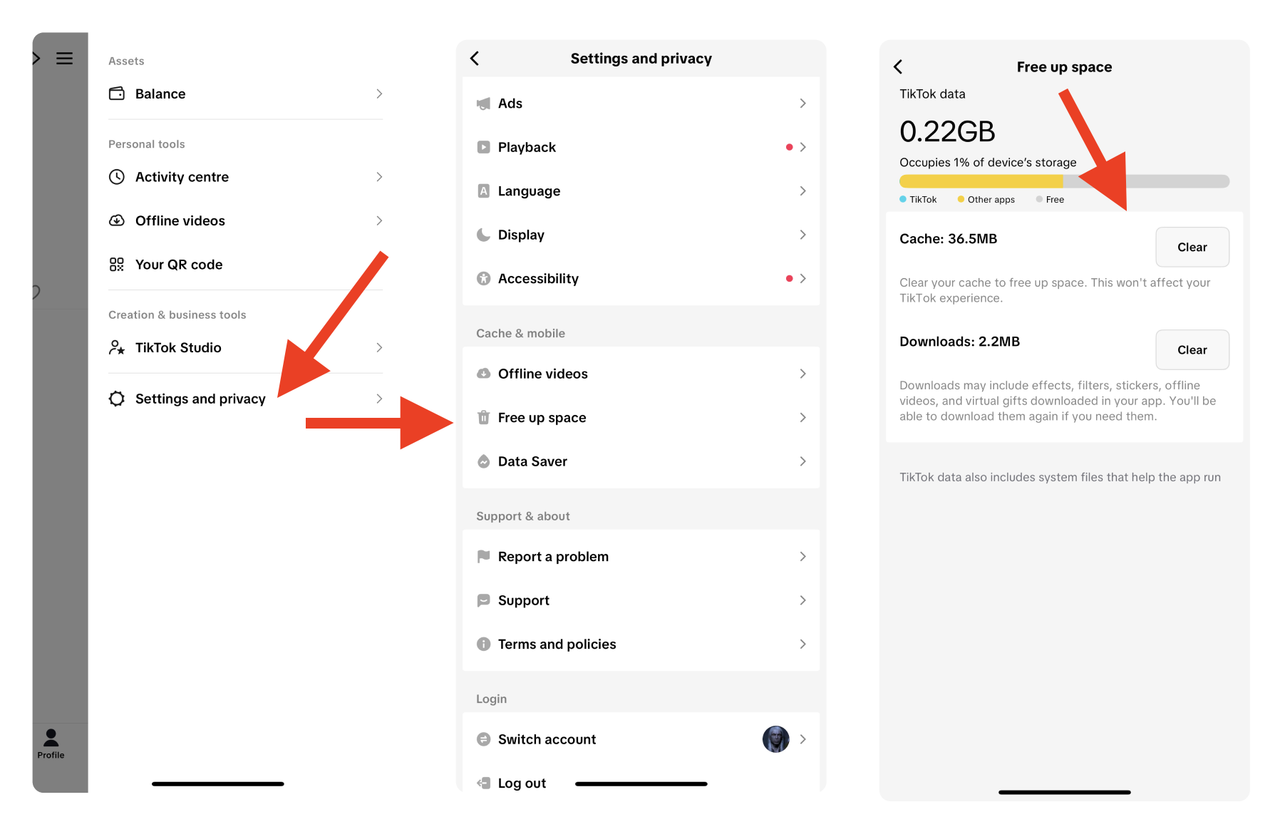
On the TikTok app, go to Profile → Settings → Free Up Space → Clear. You don’t lose your account or content, but it can free up space and remove corrupted files that may be blocking videos. Many users report that clearing the cache solves loading issues instantly.
Update the App
Running an outdated version of TikTok can cause compatibility problems. Developers frequently release updates that fix bugs or improve performance.
To update, open the App Store on iOS or Google Play Store on Android, search for TikTok, and tap Update if available. If your app is already up to date, skipping this step is fine, but checking regularly can prevent future issues.
Restart Your Device
Sometimes the simplest solution works best. Restarting your phone or tablet can clear temporary software glitches and free up memory that TikTok needs to function. It only takes a minute, but it can make a noticeable difference, especially on older devices.
Check TikTok Server Status
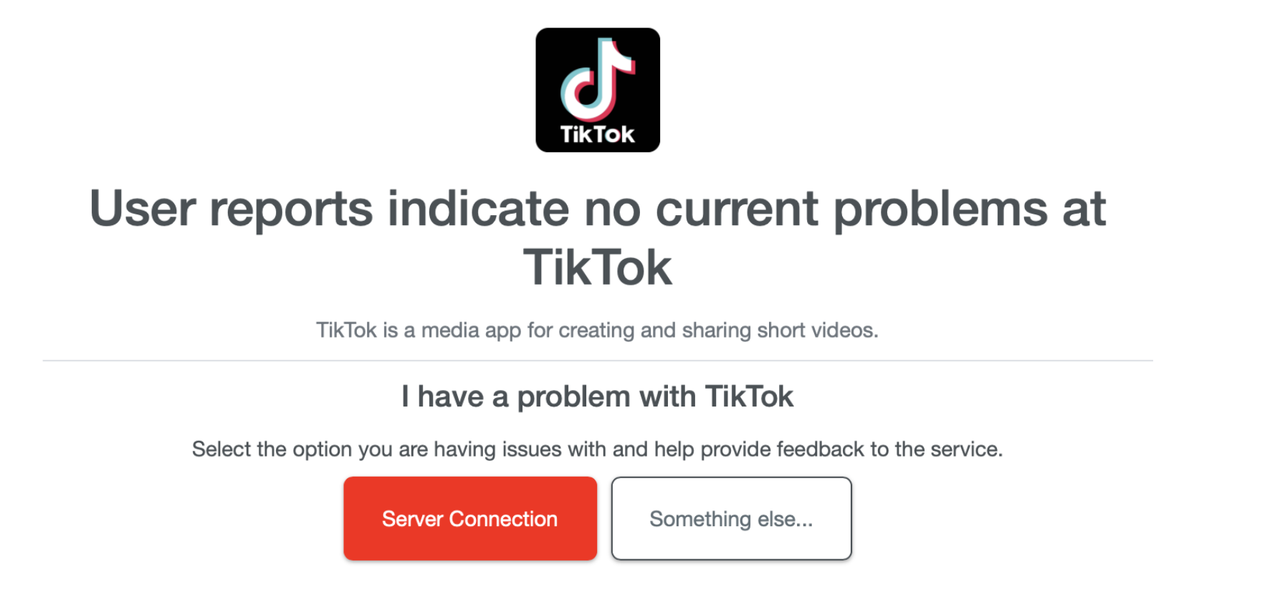
Occasionally, videos fail to load because TikTok’s servers are down. You can check platforms like Downdetector to see if others are experiencing the same problem. TikTok’s official Twitter account or in-app notifications may also provide updates during outages. If the servers are down, all you can do is wait until service is restored.
Reinstall TikTok
If clearing cache, updating, and restarting don’t work, reinstalling the app is the next step. Uninstall TikTok, then download the latest version from your app store. This can resolve deeper software issues that may not be fixed by clearing cache alone. Remember to back up any drafts or videos you don’t want to lose.
Disable (Or Enable) VPN or Proxy
Some users run TikTok through VPNs or proxies, often to access content from different regions. While this can work, it can also slow down or block video playback. Temporarily disabling any VPN or proxy often fixes the problem.
If you watch TikTok without VPN, try turning it on, as some videos might be unavailable without one.
Adjust Device Settings
Incorrect device settings can interfere with TikTok’s ability to load videos. Make sure your date and time are set correctly, as mismatched settings can block network connections. Also, confirm that TikTok has the necessary permissions, including access to storage and mobile data.
Download TikTok Videos for Offline Viewing
If TikTok keeps buffering, there’s a workaround: downloading videos for offline viewing. Tools like 4K Tokkit (TikTok downloader and viewer) and 4K Video Downloader Plus (audio and video downloader from dozens of sites) allow you to save your favorite content directly to your device.


Not only does this let you watch videos without interruptions, but it also helps when you want to access content offline or create a personal collection of clips.
All you have to do is either paste the link of the TikTok video you’d like to download, or find the videos you want to save right within the apps.
FAQ
Why is TikTok loading videos slowly even on the fast internet?
High traffic on TikTok servers, outdated app versions, or device memory issues can all slow playback, regardless of internet speed.
Will clearing cache delete my TikTok account or videos?
No. Clearing cache only removes temporary files. Your account, saved drafts, and posted videos remain intact.
How do I know if TikTok servers are down?
You can check sites like Downdetector or TikTok’s official social media accounts. Outages often affect multiple users in the same region.
Can I fix TikTok video issues without reinstalling the app?
Often, yes. Clearing cache, updating the app, restarting your device, or disabling VPNs resolves most problems. Reinstalling is usually a last resort.
Are there safe ways to download TikTok videos?
Yes. Desktop tools like 4K Video Downloader Plus and 4K Tokkit are reliable and let you save videos for offline viewing. Always respect copyright and creators’ rights when downloading content.
 SHARE ON TWITTER


Thanks for feedback
Your comments will appear here shortly. Please spread the word about us in social networks.