



Downloading a YouTube video longer than two hours means saving extended content such as podcasts, livestream replays, lectures, or long-form interviews to your device without cutting the file, reducing its quality, or running into size restrictions.
However, many users discover that not every downloader can handle multi-hour files reliably, especially when the video is stored in separate audio and video streams or when the final file exceeds several gigabytes, so let’s take a closer look at the ways of handling this unconventional task.
But let’s clear some things up first.
Can you download a YouTube video longer than 2 hours at all?
Yes, if the software you use supports large files download and doesn’t impose duration limits.
Why do some downloaders fail with long videos?
It’s because they struggle with large file sizes, unstable connections, or modern streaming formats such as adaptive streaming.
Does video length affect quality?
Length itself does not reduce quality, although improper merging of streams or forced compression can. Video quality depends on factors such as bitrate, codec efficiency (e.g., H.264 vs. H.265), resolution, and frame rate, not duration alone. Longer videos demand more total data for equivalent per-second quality; fixed bitrate budgets (common on platforms like YouTube) spread bits thinner over time, risking artifacts if not adjusted.
Key data: Daily time spent watching digital video globally has grown year-over-year through the 2020s, driven by mobile and connected TV (Statista, 2024). YouTube channels in podcasting, gaming, and education routinely publish episodes of 90 minutes to 3+ hours, and livestream replays frequently run 2–6 hours.Which Tool Should You Use? Comparison at a Glance
Use this matrix to pick the right approach before reading the step-by-step guides below.
| Tool | Setup | Handles 2+ hours | Resume support | Max quality | Best for |
|---|---|---|---|---|---|
| 4K Video Downloader Plus | Install once | ✔ | ✔ | Up to 8K | Most users, playlists, channels |
| yt-dlp (command line) | CLI setup | ✔ | ✔ | Up to 8K | Tech-savvy users, automation |
| Stacher (yt-dlp GUI) | Install once | ✔ | ✔ | Up to 8K | yt-dlp without command line |
| Browser-based downloader | None | ✖ | ✖ | Up to 1080p | Short clips only |
How to download YouTube videos longer than 2 hours
To save a long YouTube video, you can use 4K Video Downloader Plus. The process itself is straightforward when the software supports long files, although the preparation step is what determines whether the download succeeds without errors.
Follow these steps:
- Copy the full YouTube video URL from your browser.

- Open 4K Video Downloader Plus on your desktop. The app is compatible with Windows, macOS, and Linux.
- Select the required download settings in the Smart Mode: format, quality, and output folder.
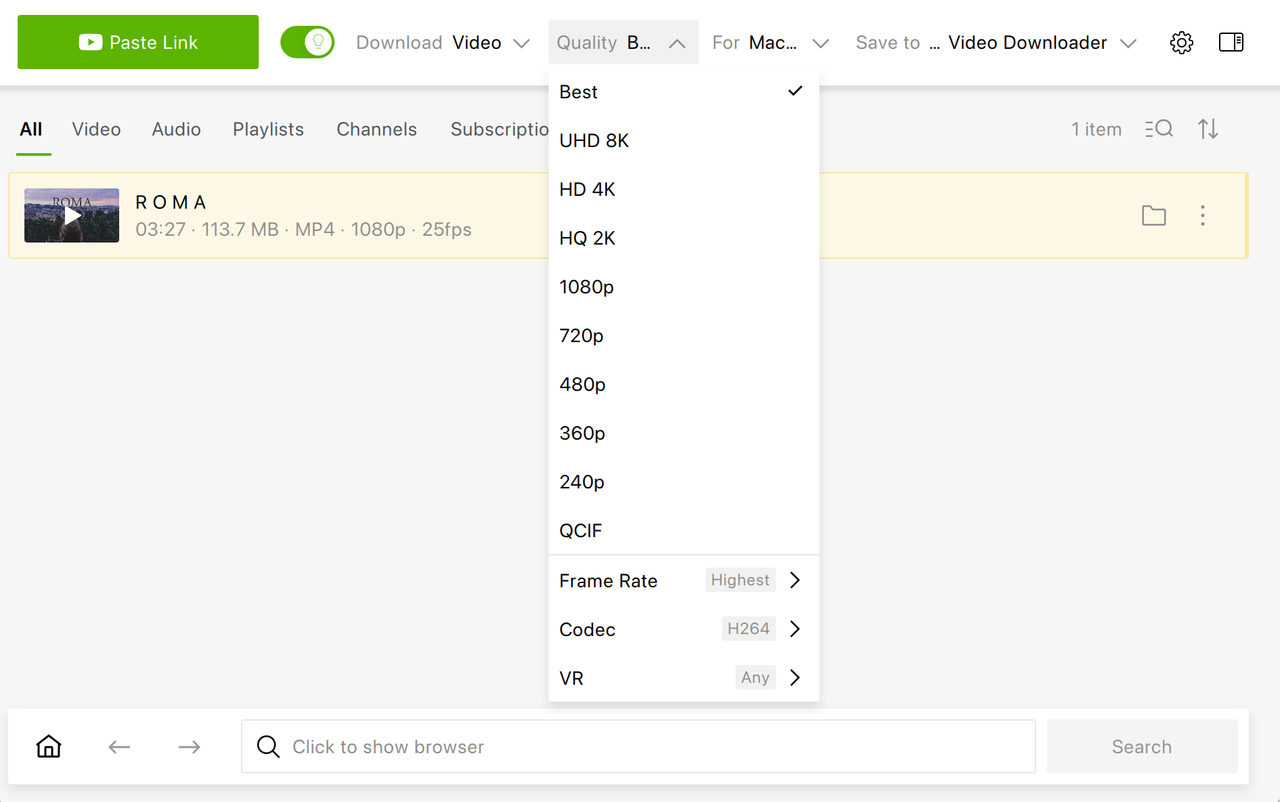
- Click “Paste Link” and allow the video to parse completely.
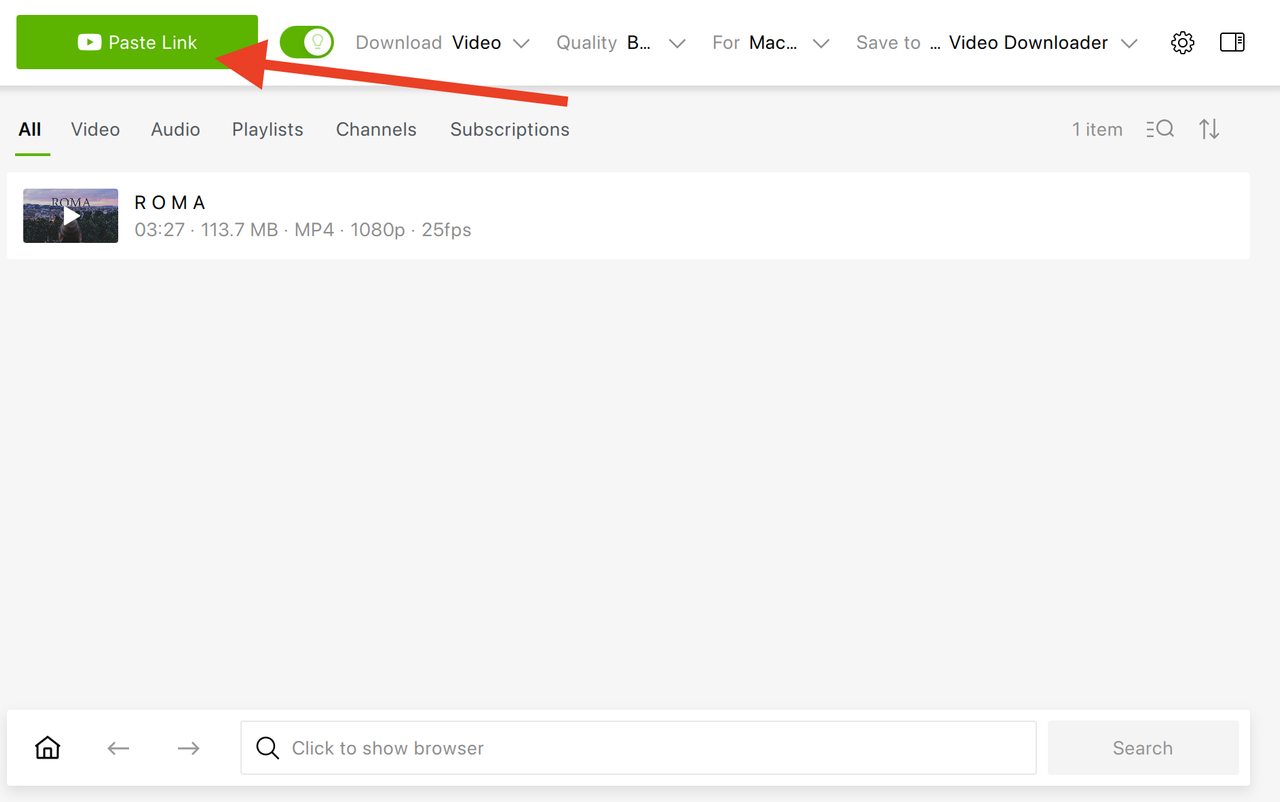
In a few moments, the video will be automatically saved on your device.
While these steps appear identical to downloading shorter clips, it’s essential to confirm that your storage drive has enough available space and that your internet connection remains stable throughout the transfer, particularly if the file exceeds several gigabytes.
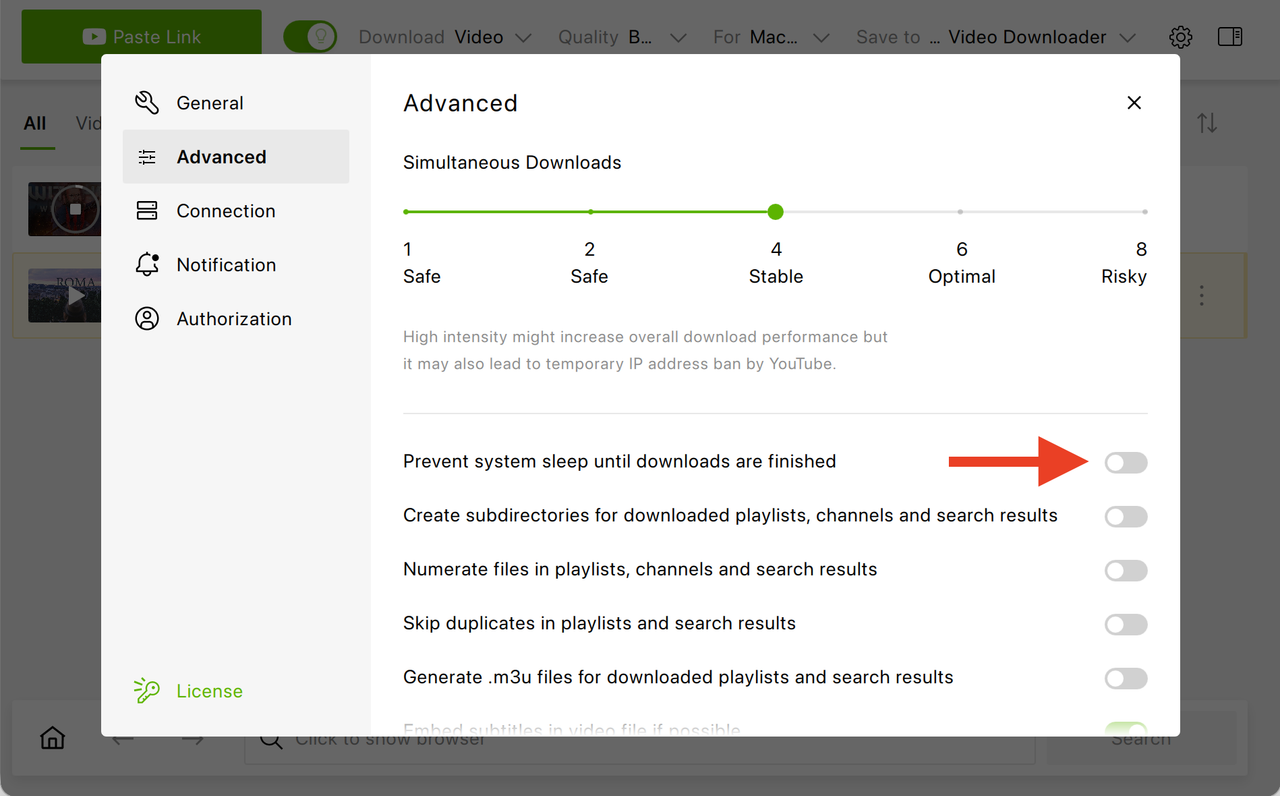
Tip: Considering that downloading a longer video might take longer than usual, this setting in 4K Video Downloader Plus is particularly helpful. To prevent system sleep until the download is finished, simply toggle this setting on (Settings -> Advanced -> Prevent system sleep until downloads are finished).
How do I download a youtube video that's over 2 hours long with command-line or advanced tools?
Here’s the quick way to download a 2+ hour YouTube video using Stacher (v7.1.5) and yt-dlp.
Option 1: Stacher (v7.1.5) (GUI for yt-dlp)
- Open Stacher.
- Paste the YouTube URL into the top bar.
- Click Formats to choose quality (for long videos, avoid 4K unless you really need it — files get huge).
- Choose:
- mp4 (video + audio, merged), or
- Best available format.
- Click Download.
Tips for long videos:
- In Settings → Advanced, make sure “Automatically merge formats” is enabled.
- Ensure you have enough disk space (2+ hour 1080p video can be 4–8 GB).
- If it fails, update yt-dlp inside Stacher (there’s an update button).
Option 2: Use yt-dlp (command line)
If you’re tech-savvy, you can try this way instead.
Basic best-quality download command

Download best video + audio and merge to MP4 (recommended)

If the video is very long and you want safer downloading (resume support)

-N 4 = 4 parallel fragments (faster)
--continue = resume if interrupted
Why long YouTube videos are harder to download
Even though long-form videos are not technically different from shorter clips, they expose weaknesses in software and hardware that may remain invisible during short downloads. Many YouTube videos use adaptive streaming (DASH), where audio and video are delivered separately and must be merged correctly after download, and when a file runs for two or three hours, even a minor interruption can corrupt the process if resume support is missing.
| Factor | Short video impact | 2+ hour video impact |
|---|---|---|
| DASH segments (separate audio/video streams) | Few segments; fast merge | Thousands of segments; timeout-prone if no resume support |
| File size | Under 1 GB; works on FAT32 drives | 7+ GB at 1080p; FAT32 max is 4 GB — causes silent failure |
| Resume support | Rarely needed | Critical — a dropped connection without resume corrupts the file |
| Browser tab stability | Usually stable | Session expiry or system sleep kills the transfer silently |
| Temporary disk space | Minimal | Merging requires 2× the final file size as temporary space |
File size also becomes a practical constraint because a two-hour 1080p video can easily exceed several gigabytes, which creates issues on drives formatted in FAT32, on mobile devices with limited storage, or inside browsers that struggle to allocate memory for extended downloads. Browser-based tools often depend on the stability of an open tab, so if the session expires or the system goes to sleep, the process may fail without warning.
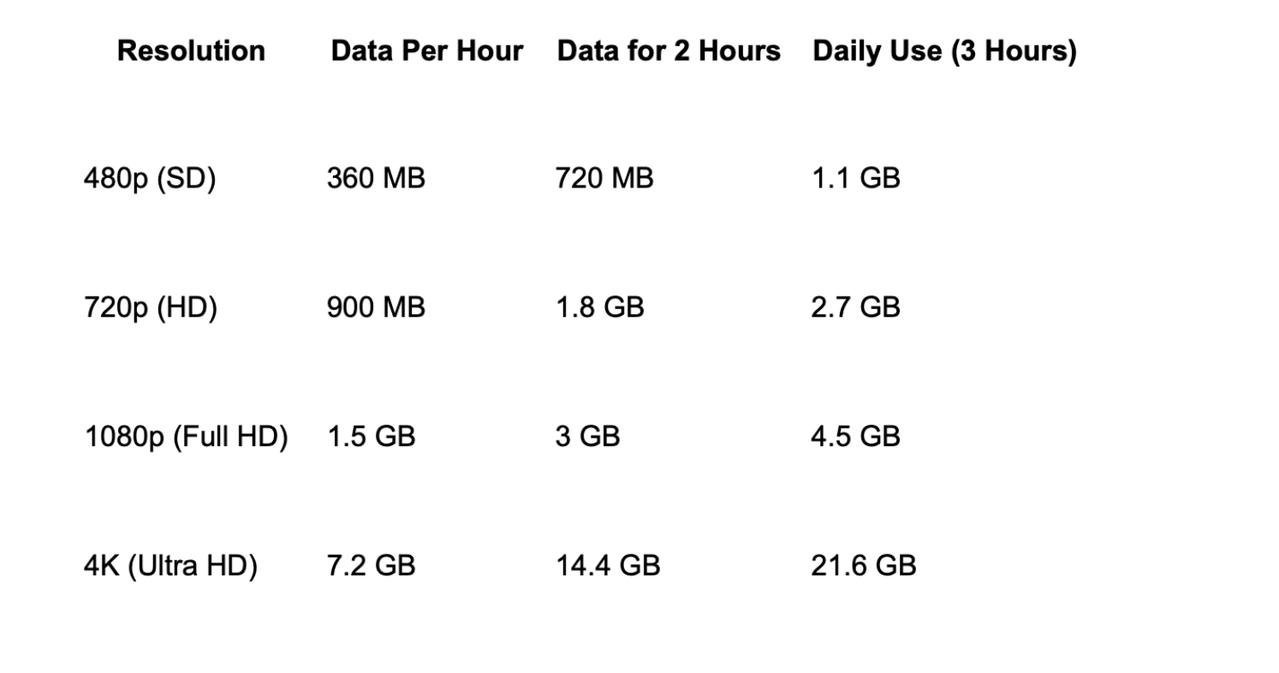
How many GB is a 2-hour YouTube video?
File size depends primarily on bitrate and resolution, and although YouTube compresses its streams, high-definition content still produces large files when downloaded in full quality.
If a two-hour video averages 8 Mbps, the resulting file will be roughly 7.2 GB, which means users working on laptops with limited SSD capacity should verify available storage before starting the download.
Here’s a table that roughly demonstrates this:
What format is best for long videos?
Choosing the correct format determines not only file size but also compatibility across devices, especially if the video is meant for archiving or playback on mobile hardware.
| Format | Device compatibility | Best for long videos | Key trade-offs |
|---|---|---|---|
| MP4 | Excellent — all devices | Portability, streaming, mobile playback | Limited subtitle/multi-audio track support |
| MKV | Good — VLC, desktop players | Archiving, multiple audio tracks, subtitles | Larger files; limited mobile support |
Bottom line: Use MP4 for portability and everyday playback. Use MKV when archiving a video with multiple audio tracks or embedded subtitles matters more than device compatibility.
Frequently Asked Questions
Is it legal to download long YouTube videos?
Downloading for personal offline viewing may be permissible under local fair-use provisions, but the YouTube Terms of Service restrict unauthorized downloading outside officially provided features. Do not redistribute downloaded content without the rights holder's permission.
Can I download a 3-hour video in 4K?
Yes, as long as the source video is available in 4K and your downloader supports large high-bitrate streams. Storage requirements can exceed 20 GB, so verify available disk space before starting.
Why does the download stop at 99%?
A stall at 99% almost always indicates a stream-merging issue or insufficient temporary disk space. The app needs roughly 2× the final file size as working space during the merge step. Free up space or change the output folder to a drive with more capacity.
How much space does a 2-hour 1080p video take?
A 2-hour 1080p YouTube video typically requires between 3 and 8 GB, depending on the video's bitrate and encoding efficiency. See the full file size table above for all resolutions.
Why is audio out of sync in long downloads?
Audio desynchronization occurs when the video and audio streams are merged incorrectly — a more common failure in very long files. Converting the file to MP4 using a tool like HandBrake or ffmpeg typically resolves the issue.
Can I download a livestream replay longer than 2 hours?
Yes. Once the livestream has finished processing on YouTube and is available as a standard playback video (not an active broadcast), paste the VOD URL into 4K Video Downloader Plus or yt-dlp. Processing can take a few hours after the stream ends.
Before You Start — Quick Checklist
- Check available disk space — at least 2× the expected file size for safe merging.
- Confirm your drive is formatted as exFAT or NTFS (not FAT32) for files over 4 GB.
- Use a desktop app — browser-based tools are not reliable for 2+ hour videos.
- Enable resume support or Smart Mode in your downloader.
- Enable "Prevent system sleep" for downloads that take more than 30 minutes.
- Update your downloader before starting — YouTube changes delivery formats regularly.
 SHARE ON TWITTER


Thanks for feedback
Your comments will appear here shortly. Please spread the word about us in social networks.