




Watching Vimeo on a laptop is convenient, but watching it on a 55-inch TV is a different experience entirely, especially when you are screening a short film, reviewing a client project, hosting a workshop, or simply enjoying a documentary in full resolution.
In 2026, Vimeo remains one of the main platforms for independent cinema, creative portfolios, professional courses, and niche documentaries that rarely appear on mainstream streaming services. Yet getting Vimeo onto a TV screen is not always as straightforward as opening Netflix, because device compatibility, app availability, and internet stability still vary from one setup to another.
This guide explains every reliable way to watch Vimeo on your TV today, from official apps and casting to offline playback using 4K Video Downloader Plus, and it clarifies when each method makes practical sense.
Can You Watch Vimeo on TV Directly?
Yes, although the exact process depends on your device and operating system.
Method #1. Use the Official Vimeo App
Vimeo offers a dedicated app for certain Smart TVs and streaming devices, including Apple TV (tvOS 18+). If your television supports the app natively, you can install it through the built-in app store, log in to your account, and browse your library or rented content directly from the TV interface. Vimeo apps are native on platforms like Apple TV, Roku, Amazon Fire TV, and some Samsung/LG/Sony Smart TVs (post-2020 models). Note, though: older models often lack support, requiring casting via AirPlay or Chromecast.
However, compatibility is not universal, particularly with older Smart TV models, and playback quality depends heavily on the stability of your internet connection. Even when a Vimeo video is available in 4K, streaming over unstable Wi-Fi may result in automatic resolution reduction or buffering, which can be noticeable during longer screenings or professional presentations. Accessing private or password-protected videos can also require additional authentication steps or workarounds, like adding to "Watch Later" lists first, then password entry in-app, which may complicate live events or classroom sessions.
For casual home viewing, the official app is often sufficient. For public screenings or business environments, relying entirely on live streaming introduces variables that are not always under your control.
Method #2. Cast Vimeo from a Phone or Computer
If your TV does not offer the Vimeo app, casting remains a common alternative. Devices such as Chromecast or Apple TV allow you to transmit video from your browser or mobile app directly to the television screen.
In practice, you open Vimeo in your browser, select the cast option, and the content appears on your TV while your phone or laptop acts as the source device. This method works well for spontaneous viewing sessions, but it still depends entirely on network stability, and any fluctuation in bandwidth can affect image quality or cause playback interruptions. During conference presentations or portfolio reviews, where timing matters and interruptions look unprofessional, even brief buffering can become distracting.
Casting also occupies your primary device for the duration of playback, which may not be ideal if you need to access notes, emails, or other materials simultaneously.
Why Download Vimeo Videos Before Watching on TV?
Streaming offers convenience, but downloading offers control.
When you download a Vimeo video in advance, you eliminate buffering risks and preserve the original resolution provided by the platform. If a film is available in 4K, you can play it locally in full quality without compression artifacts introduced by fluctuating internet speeds.
Local playback through USB or HDMI often delivers smoother performance than browser-based streaming because the television processes a stable file rather than a live data stream.
It is important to download only videos you have permission to use, including your own uploads, purchased content, or videos explicitly made available for download by their creators.
How to Watch Vimeo on TV Using 4K Video Downloader Plus
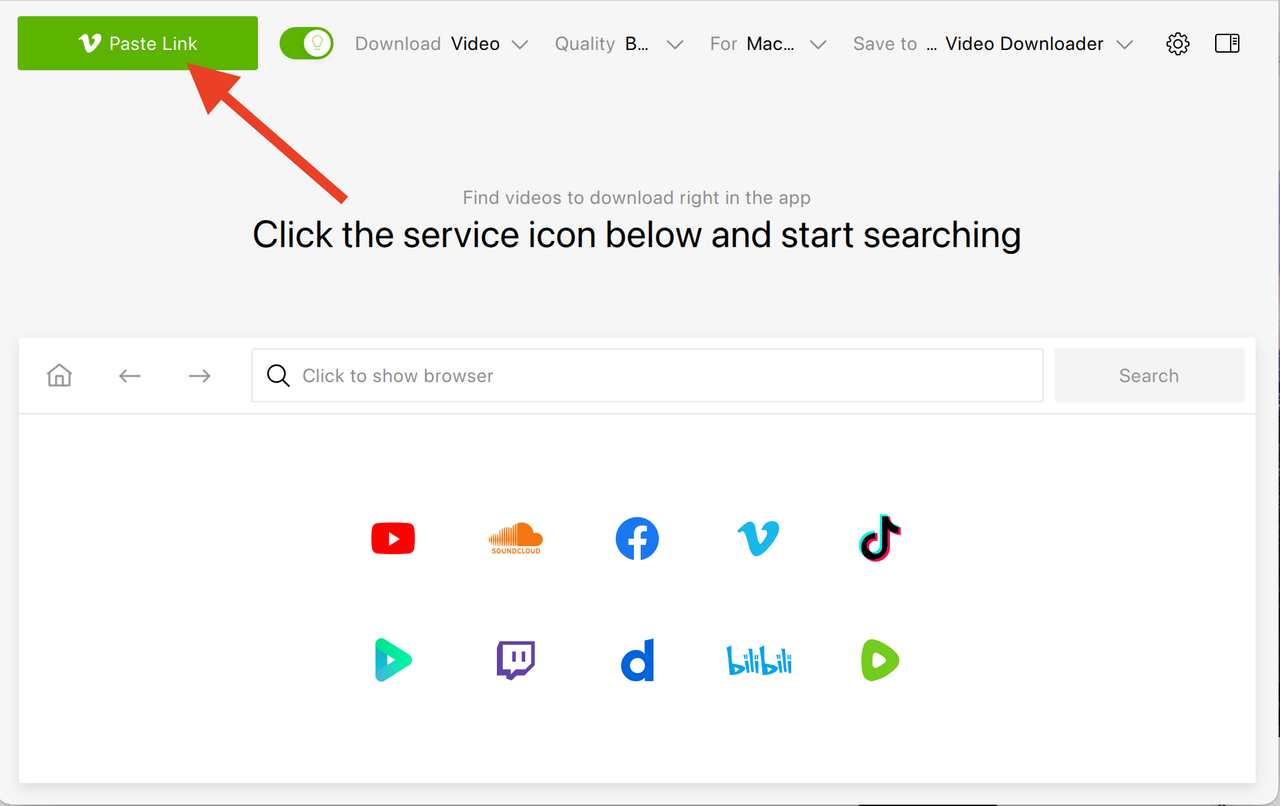
4K Video Downloader Plus allows you to download Vimeo videos directly to your computer so that you can transfer them to your TV and watch them offline without relying on streaming. Here’s a step-by-step guide:
- Download and install 4K Video Downloader Plus on your Windows, macOS, or Linux computer.
- Open Vimeo in your browser, find the video you want to watch, and copy its URL from the address bar.
If you are logged in to your account, you can also access private or purchased videos that are available to you.
- Paste the link into 4K Video Downloader Plus. The application analyzes the video and presents available resolutions and formats.
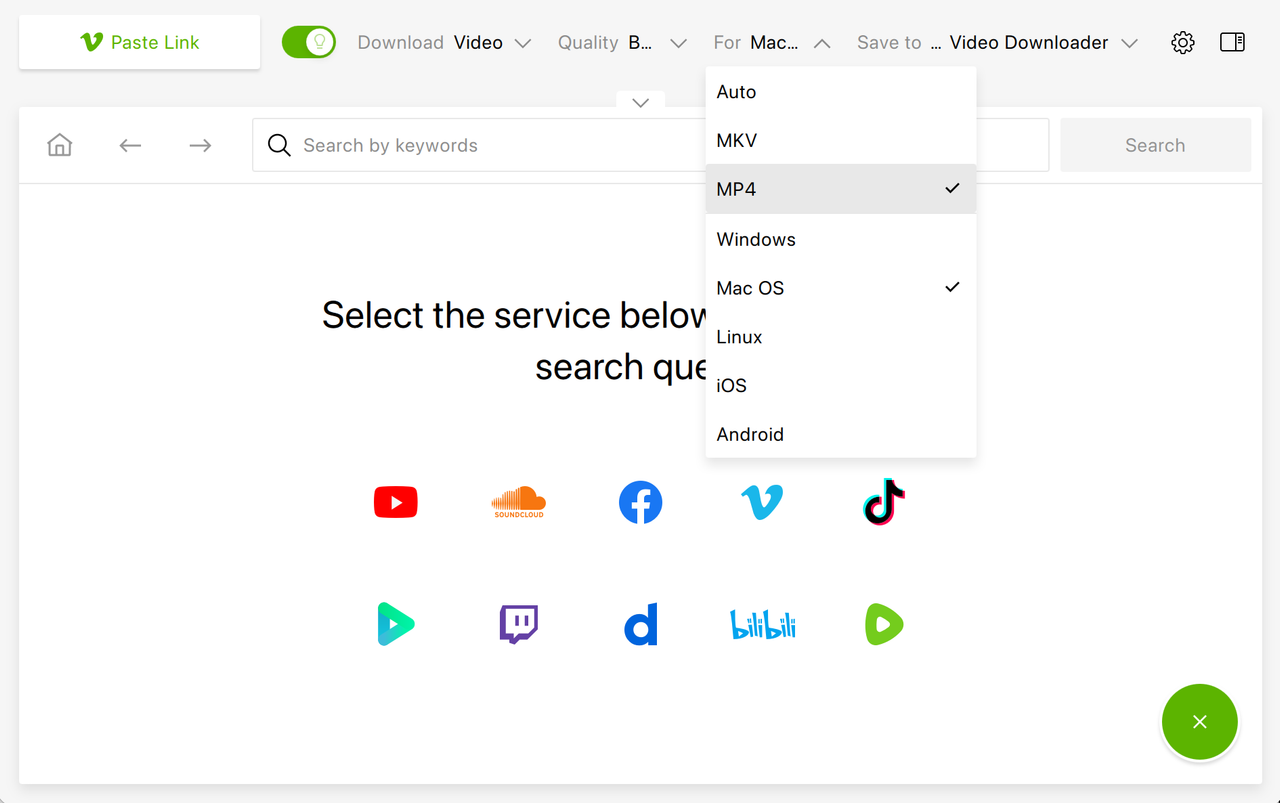
For TV playback, MP4 is typically the safest option because it is supported by most Smart TVs and media players.
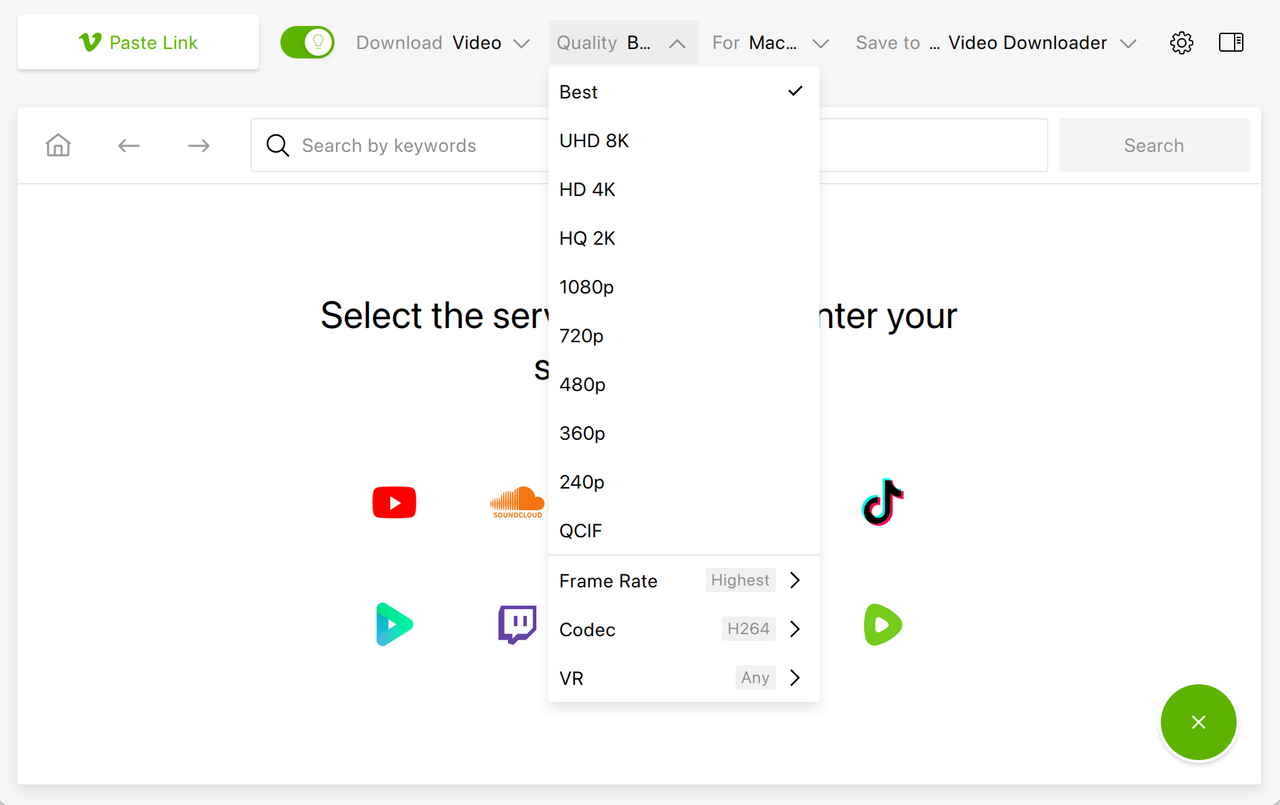
If the video is available in 4K, select the highest resolution your television supports to ensure optimal image quality.
- Once downloaded, transfer the file to your television. There are several ways to do that.
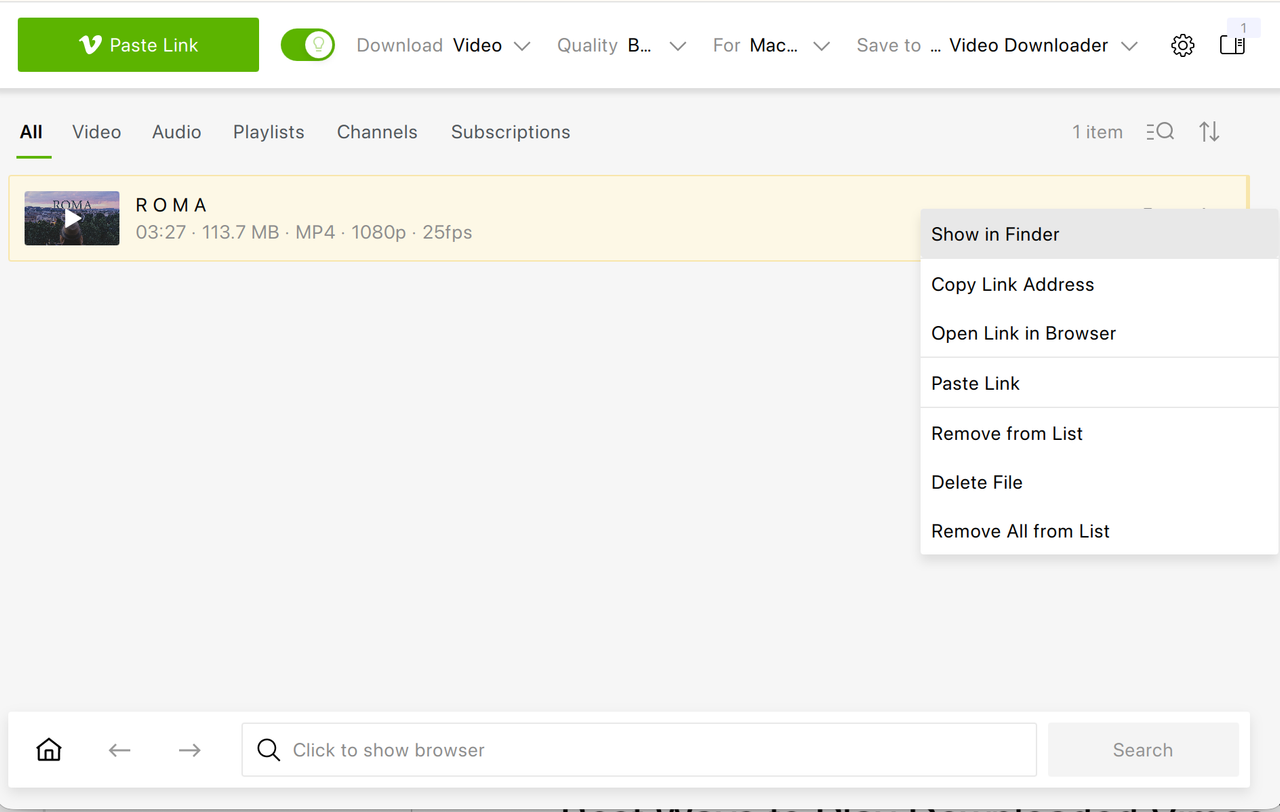
The most reliable method is copying the MP4 file onto a USB flash drive or external hard drive and connecting it directly to the TV’s USB port, which may require compatible codecs like H.264/AAC in MP4s. Most modern Smart TVs recognize external storage automatically and allow playback through their built-in media player. Unsupported codecs may fail though, needing conversion.
Alternatively, you can connect your laptop to the TV via HDMI and play the downloaded file directly from your computer, which mirrors the screen in full resolution.
For users who maintain a home media server, applications such as Plex allow for streaming locally stored files across devices within your home network while maintaining high image quality.
Tip: Browse Vimeo videos and download them right in 4K Video Downloader Plus without leaving the app.
Best Ways to Play Downloaded Vimeo Videos on Different TVs
Most Smart TVs handle USB playback via native players, though success hinges on compatible codecs (e.g., H.264/AAC in MP4) rather than just file systems.
Samsung/LG TVs
Samsung and LG Smart TVs support USB drives in FAT32, NTFS, or exFAT, auto-accessing MP4s through media browsers like Source > USB. Non-playing files often stem from unsupported codecs or high bitrates; reformatting to FAT32/NTFS or converting codecs (not just the drive) fixes most cases.
Android TV
Built-in file managers work, but apps like VLC reliably play diverse codecs, including high-bitrate 4K, outperforming stock players on many devices.
Apple TV
Apple TV lacks USB playback; AirPlay from a Mac mirrors local files effectively, while Plex/Infuse servers enable direct library access with smooth quality. Web streaming is less ideal than local server methods due to potential buffering.
Non-Smart TVs
HDMI from a laptop provides universal, high-resolution playback without format or network concerns, making it the simplest fallback.
Troubleshooting: Vimeo Not Playing Properly on TV
If your downloaded Vimeo video doesn’t play correctly, the issue usually relates to format or codec compatibility. Converting the file to standard MP4 with H.264/AAC video encoding typically resolves most playback problems on older TVs. Older TVs favor H.264 MP4; transcoding Vimeo exports resolves most glitches via tools like HandBrake.
If there is no sound, the audio codec may not be supported by your television’s built-in player, in which case using VLC on Android TV or playing through HDMI from a laptop can solve the problem.
When 4K resolution does not display correctly, verify that your HDMI cable supports 4K output and that your TV’s HDMI port is configured for enhanced or UHD mode in the settings menu. HDMI cables must be Premium High-Speed (18Gbps) for 4K/60Hz; enable "Enhanced HDMI" or UHD Deep Color in TV settings.
If a USB drive is not detected, reformatting it to exFAT often restores compatibility, though FAT32 offers wider support, but back up data first.
Frequently Asked Questions
Can I watch private Vimeo videos on TV?
Yes, provided you have access to them through your Vimeo account. Downloading them with 4K Video Downloader Plus requires that you are authorized to view the content.
Can I download Vimeo videos in 4K?
If the uploader has made 4K resolution available, you can download it in that quality and watch it offline on your TV.
Why won’t Vimeo cast to my TV?
Casting issues usually result from network instability, incompatible firmware versions, or outdated apps. Restarting devices and updating software often resolves the problem.
What format works best for Smart TVs?
MP4 with standard H.264 video encoding is the most widely supported format across Smart TV brands.
There are several ways to watch Vimeo on your TV in 2026, but not all of them offer the same level of reliability. The official app and casting features are convenient for everyday use, yet both depend on stable internet access and device compatibility. Downloading videos in advance with 4K Video Downloader Plus provides greater control over quality and playback, which makes it especially suitable for presentations, screenings, and high-resolution home viewing where interruptions are not an option.
 SHARE ON TWITTER


Thanks for feedback
Your comments will appear here shortly. Please spread the word about us in social networks.