



To download a Bilibili video to your device at resolutions up to 1080p, bypassing the 480p quality cap, you need a tool such as 4K Video Downloader Plus, which, unlike most generic online downloaders, isn't affected by the quality restrictions implied by Bilibili.
Why Bilibili Videos Appear in 480p with Most Downloaders
Bilibili uses DASH (Dynamic Adaptive Streaming over HTTP), which splits video and audio into separate streams and serves different quality tiers based on user authentication. Tools that don't log in to a Bilibili account only receive the public-facing 480p or 360p stream; not because of a global platform restriction, but because the high-bitrate streams are server-side locked behind authentication.
This is why pasting a Bilibili link into a random online tool often results in a 360p–480p or broken download: the tool is accessing Bilibili as a guest and never reaches the HD stream.
How to Download Bilibili Videos in 1080p with 4K Video Downloader Plus
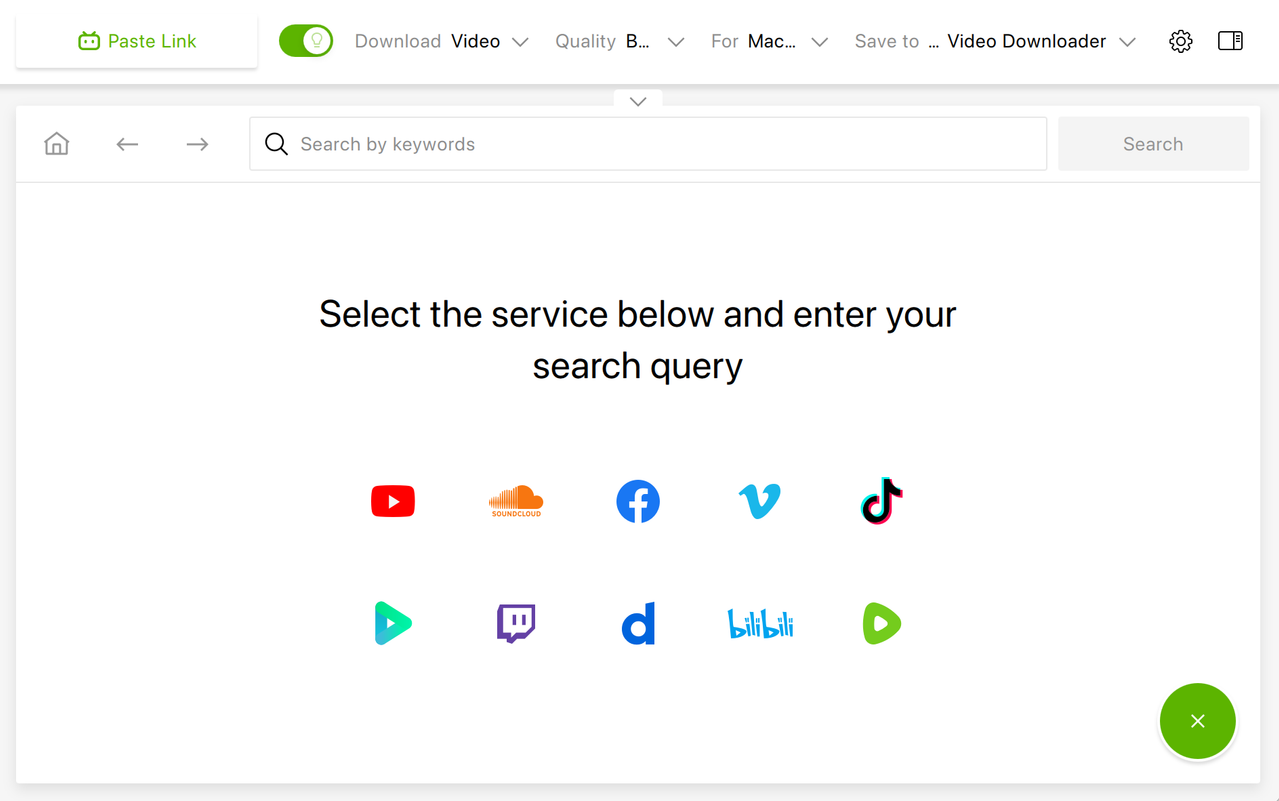
4K Video Downloader Plus handles Bilibili's HD streams directly, no account login required as of the 2025 update. Here's the step-by-step process:
- Download 4K Video Downloader PlusGet it from the 4K Download website. The app runs on Windows, macOS, and Ubuntu.
- Install and launch the appInstall and launch 4K Video Downloader Plus on your computer.
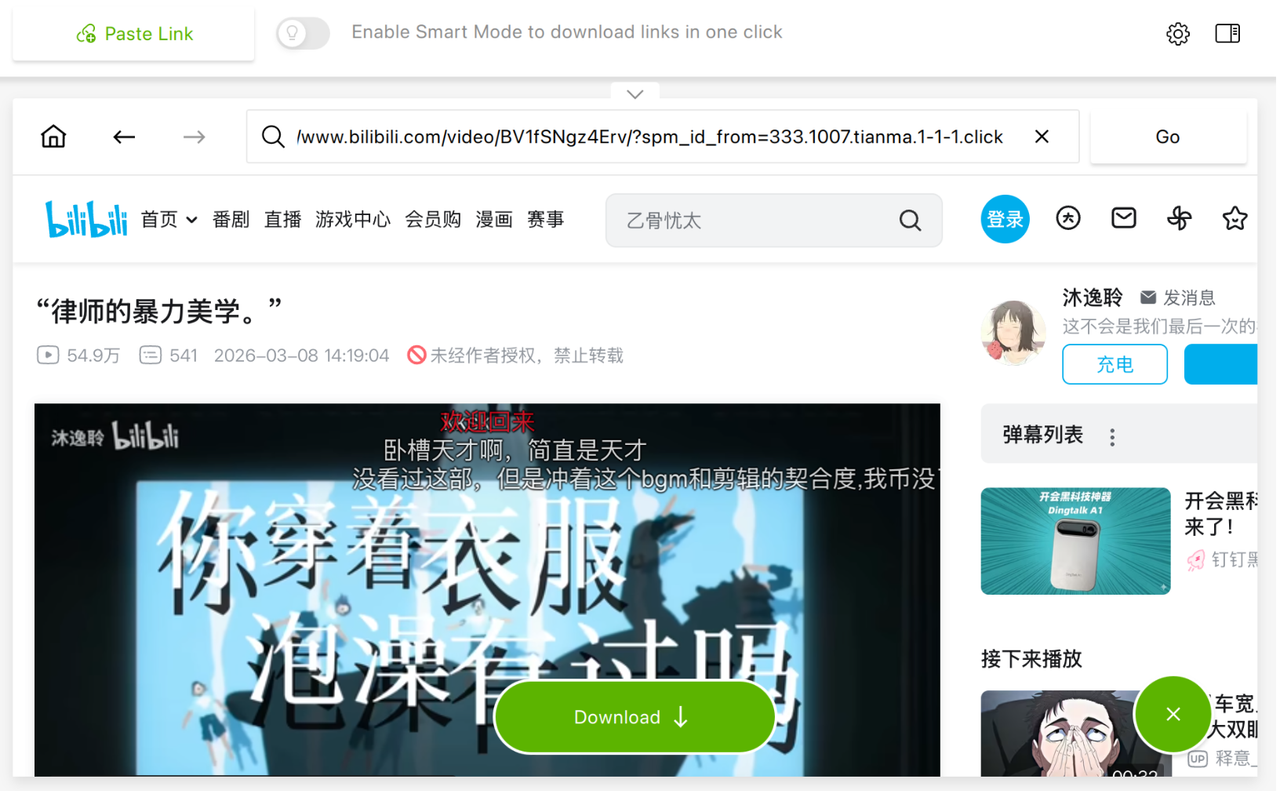
- Copy the Bilibili video URLOpen the Bilibili video in your browser and copy the URL from the address bar, or use the in-app browser to find a video you want to download.
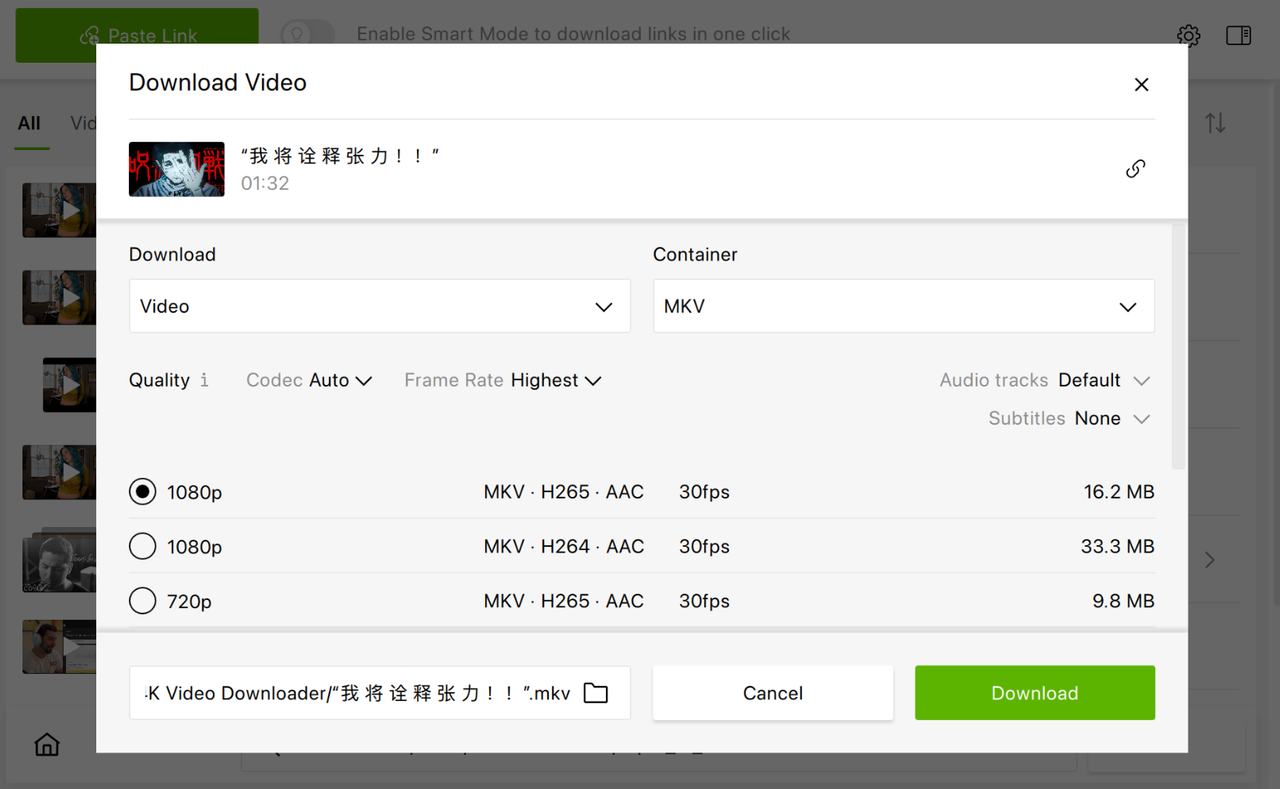
- Click "Paste Link"The app parses the video automatically.
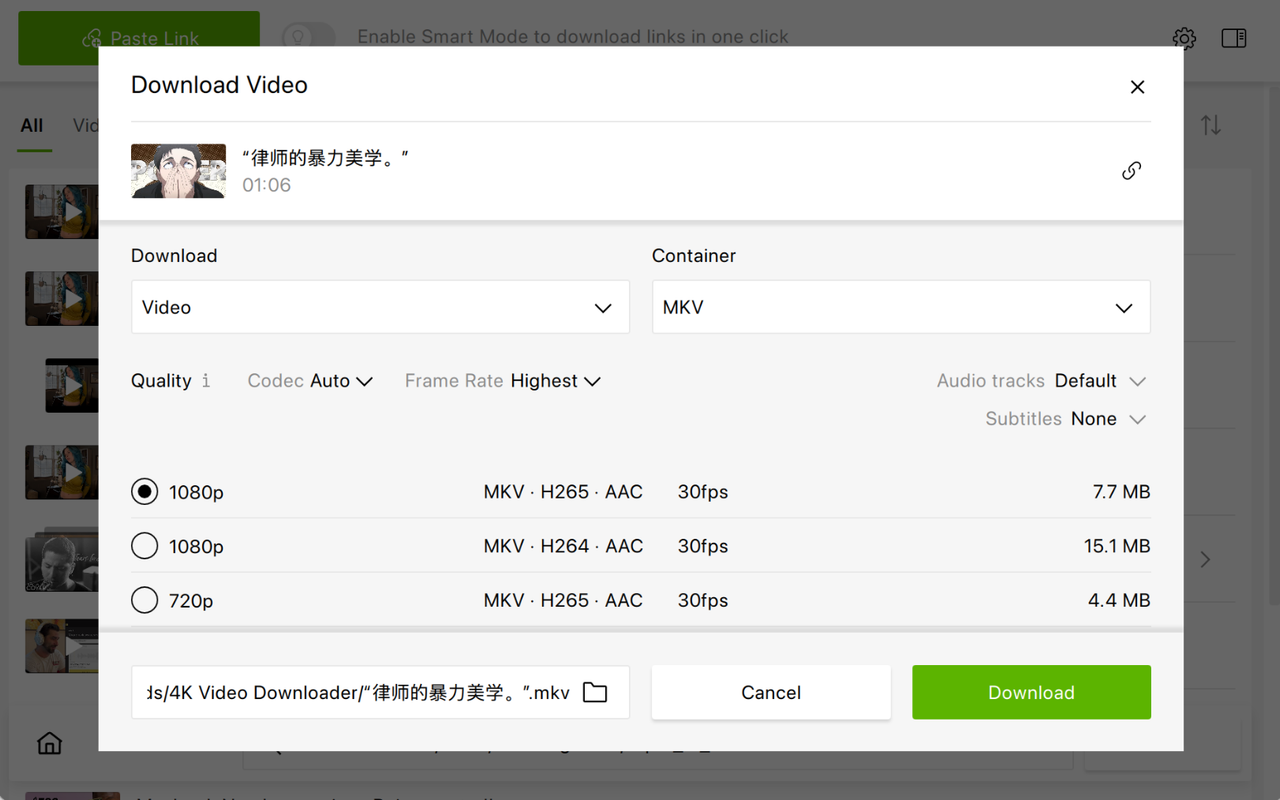
- Select your resolutionChoose 720p or 1080p from the quality options.
- Click DownloadThe video saves to your device in HD.
How to Access Member-Exclusive or Premium Bilibili Videos
For videos locked behind a Bilibili account or Big Member (premium) subscription, you can log in through the app's built-in browser. When you're logged in to your Bilibili account in-app, 4K Video Downloader Plus can access streams your account has permission to view.
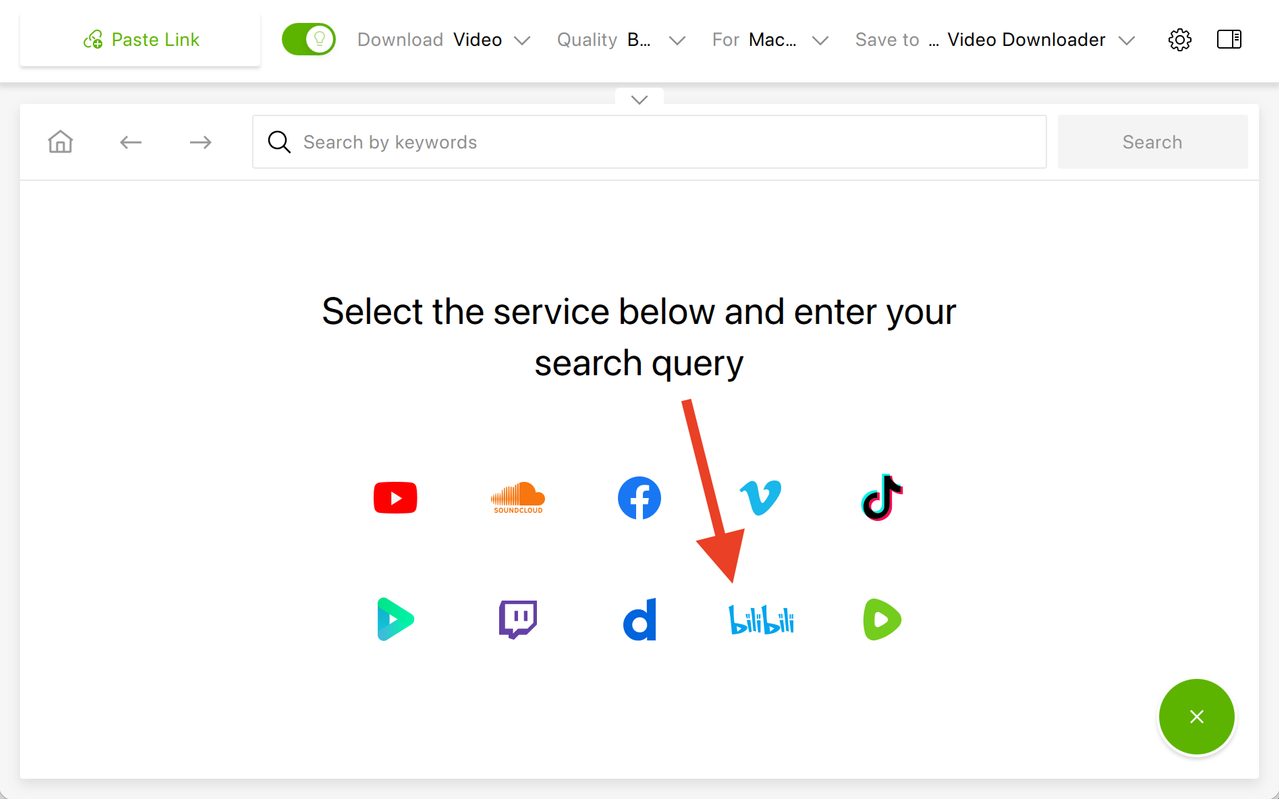
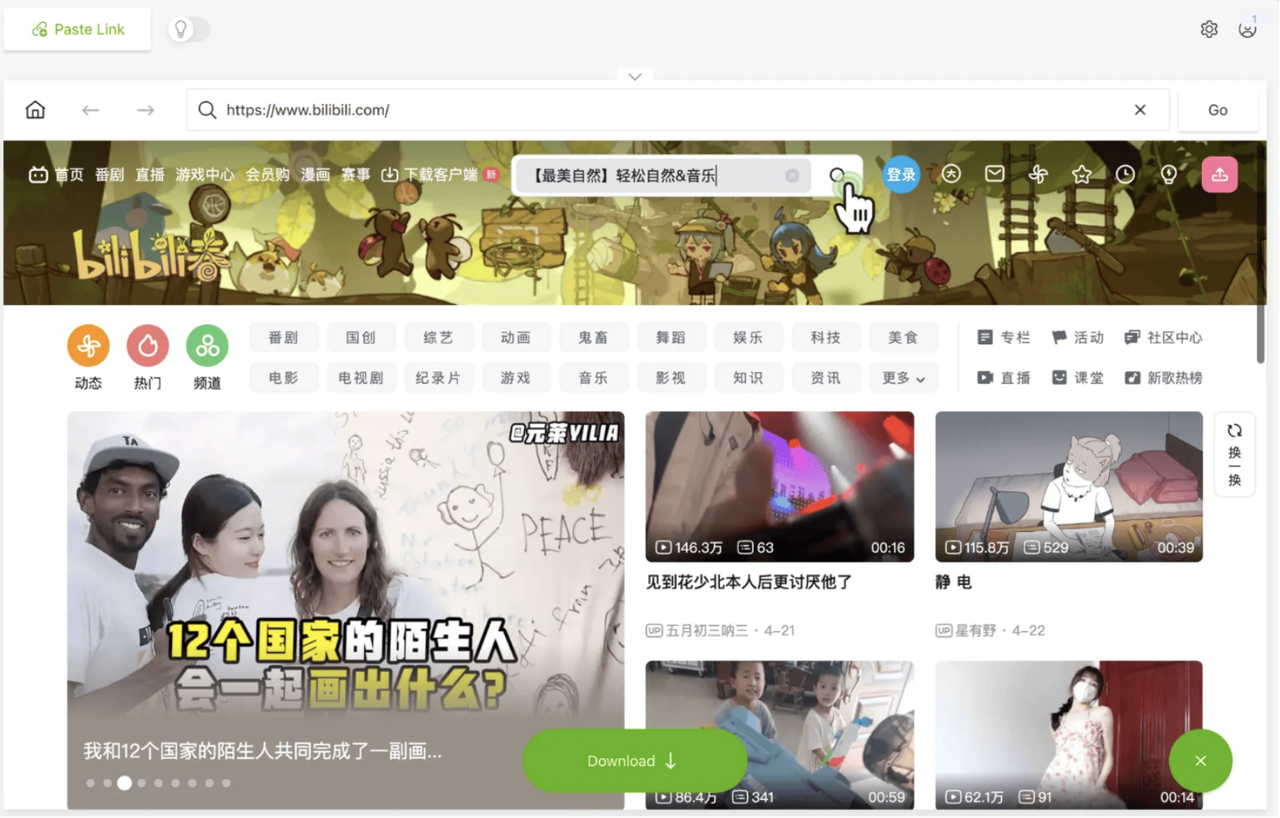
- Launch 4K Video Downloader Plus and open its built-in browserFind the Bilibili logo and click on it.
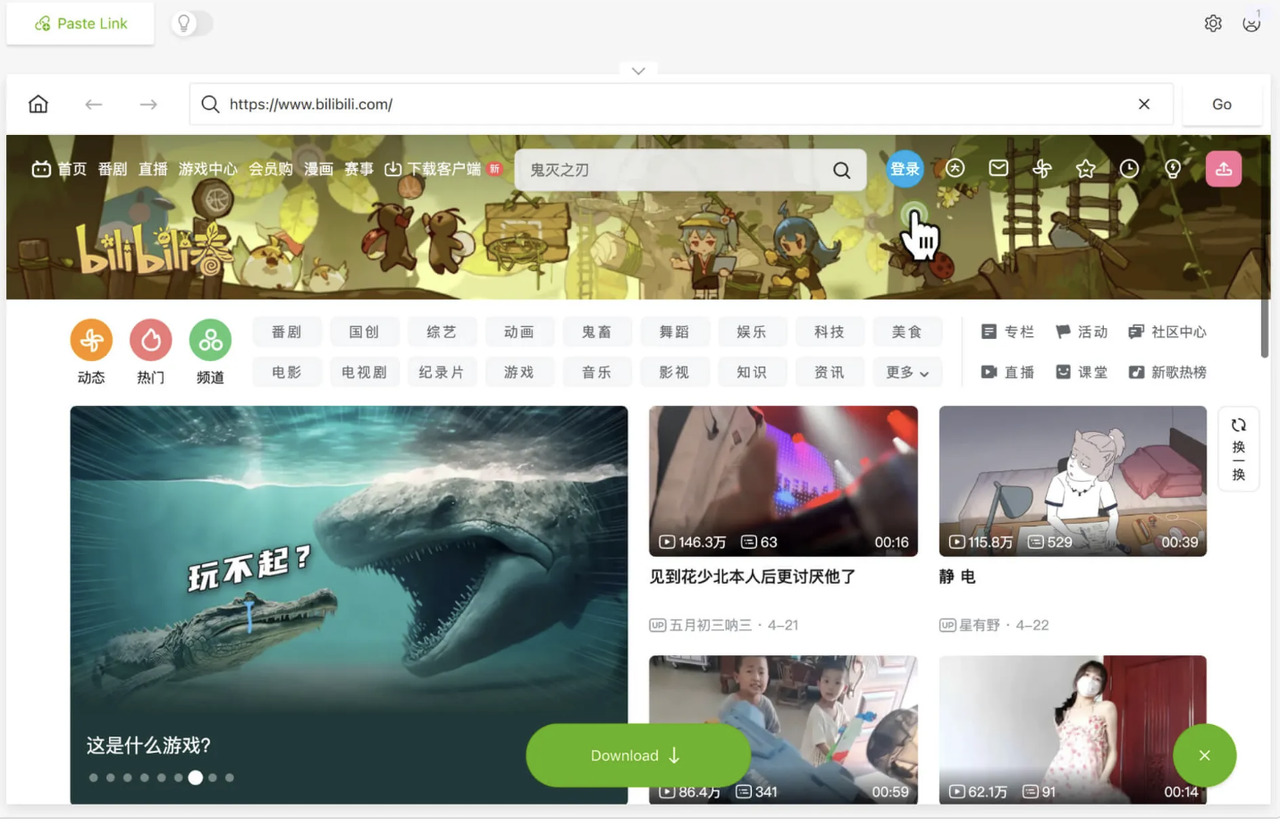
- Wait until 4K Video Downloader Plus opens Bilibili main page in the in-app browserClick the sign-in button located to the right of the site search bar.
- Enter your login credentialsSign in to your Bilibili account.
- Enter the name of the video you want to downloadOpen the video and click the Download button.
- Select the format, quality and output folderClick Download. The video will be saved in a dedicated folder on your computer.
Other Methods to Download Bilibili Videos
Method 1 Official In-App Download (Offline Viewing Only)
This is the safest and legal method if you just want to watch videos offline on a mobile device. Downloads are DRM-locked and can only be played inside the Bilibili app — they cannot be transferred, converted, or re-uploaded.
On iOS or Android:
- Open the Bilibili app and find the video.
- Tap the Download (缓存) icon below the player or in the video menu.
- Select your quality (SD / HD / FHD) and wait for the download.
- Access saved videos in the app's Downloaded or Offline section.
On the Bilibili PC client:
- Play the video in the Bilibili desktop app.
- Click the Download button if available. Note that not all videos support offline caching due to copyright restrictions.
Method 2 Online Downloader Websites (Quick MP4, No Install)
Use these when you need an MP4 file quickly without installing software. Quality is usually limited to 480p–720p since these tools access Bilibili without account authentication.
Verified working tools (tested 2025–2026):
- bilibili-video-downloader.com
- dlbunny.com/en/bilibili
- locoloader.com/bilibili-video-downloader
- Open the Bilibili video in your browser and copy the URL.
- Paste the link into the website's input box and click Download.
- When the download link appears, right-click Download Video → Save link as… to save the MP4 file.
Method 3 Browser Extensions (Chrome)
Extensions add a download button directly to the Bilibili page and are useful if you frequently save videos without wanting to install separate software.
Verified extensions (Chrome Web Store):
- Bilibili Downloader — lets you pick resolution (720p / 1080p / 4K) and download DASH-segmented videos.
- Download Bilibili videos — adds a download button on Bilibili video pages and exposes direct stream links.
- Install the extension from the Chrome Web Store.
- Open the Bilibili video page and click the extension icon.
- Choose your resolution and click Download — the video saves to your default downloads folder.
Comparison: All Bilibili Download Methods
| Feature | Official App | Online Tools | Browser Extensions | 4K Video Downloader Plus |
|---|---|---|---|---|
| Max resolution | FHD (in-app) | 480p–720p | 720p–1080p | 1080p+ |
| Requires installation | ✔ Bilibili app | ✖ | ✔ extension | ✔ desktop app |
| Saves as external MP4 | ✖ | ✔ | ✔ | ✔ |
| DRM-free file | ✖ | ✔ | ✔ | ✔ |
| Audio merged correctly | ✔ | ✖ often missing | ✔ | ✔ |
| No ads during process | ✔ | ✖ | ✔ | ✔ |
| Playlist / batch download | ✖ | ✖ | ✖ | ✔ |
| Login required for HD | ✔ | ✖ (can't reach HD) | Optional | ✖ since v25.0 |
| MP3 / audio-only export | ✖ | ✔ some tools | ✔ some | ✔ |
Frequently Asked Questions
Do I need a Bilibili account to download in 1080p with 4K Video Downloader Plus?
No. Since version 25.0 (released February 2025), 4K Video Downloader Plus downloads Bilibili videos in HD without requiring you to log in to a Bilibili account.
Why does my free online downloader only give 480p?
Online tools access Bilibili as a guest. Bilibili only serves the public 360p-480p stream to unauthenticated requests. A dedicated desktop downloader that handles Bilibili's streams directly, like 4K Video Downloader Plus, bypasses this limitation.
Can I download an entire Bilibili channel or playlist?
Yes. 4K Video Downloader Plus supports batch downloads from playlists and channels. Paste the playlist or channel URL, and select the videos you want to save.
Is downloading Bilibili videos legal?
Downloading for personal, offline use of content you have the right to access is generally permitted. Redistributing downloaded videos without the rights holder's permission violates Bilibili's terms of service and may infringe copyright.
Does 4K Video Downloader Plus support other platforms besides Bilibili?
Yes. 4K Video Downloader Plus supports YouTube, Vimeo, TikTok, Facebook, SoundCloud, Twitch, and dozens of other sites.
How do I download Bilibili video as MP3 audio only?
In 4K Video Downloader Plus, when the format selection window appears after pasting the link, choose MP3, M4A, or OGG instead of a video format; the app extracts audio only. For an online option, most web-based Bilibili downloaders also offer an MP3 output option on the download page.
Can I download 4K Bilibili videos?
4K streams on Bilibili are locked behind a Big Member (premium) subscription, a free account does not grant 4K access. If your Bilibili account has Big Member status, 4K Video Downloader Plus can download at 4K by logging in via the built-in browser.
Most free Bilibili downloaders cap out at 480p because they access Bilibili as a guest, the platform only serves HD streams to authenticated requests. For a quick grab, online tools work at standard quality. For proper 1080p MP4 files with audio merged correctly, 4K Video Downloader Plus is the most reliable option: since version 25.0 (February 2025), it downloads Bilibili in HD without requiring login, handles audio/video download correctly, and supports playlist and audio-only (MP3) exports.
 SHARE ON TWITTER


Thanks for feedback
Your comments will appear here shortly. Please spread the word about us in social networks.