



Quick answer: For Mac users whose main task is saving YouTube videos, playlists, channels, subtitles, and multilingual audio tracks, 4K Video Downloader Plus is the stronger choice in 2026. It runs on macOS, Windows, and Linux, supports resolutions up to 8K, and includes built-in audio processing tools and dubbed-track downloads that Downie doesn’t offer. Downie remains worth considering only if your priority is breadth: it covers more than 1,000 smaller websites beyond YouTube, at the cost of a narrower, YouTube-specific feature set and Mac-only availability.
Both apps solve the same basic problem: getting a video off the internet and onto a Mac’s hard drive but they were built around different priorities. Downie, from Charlie Monroe Software, is a general-purpose grabber that plugs into more than a thousand sites through a lightweight drag-and-drop interface. 4K Video Downloader Plus was primarily built with YouTube’s ecosystem specifically in mind: playlists, channels, subtitles, dubbed audio tracks, and post-download audio cleanup all live inside one app, even though it can download audio and video content from other sites, including Twitch, Facebook, SoundCloud, Dailymotion, Rumble, BitChute, Vimeo, and more. If you’re deciding between the two for Mac use in 2026, the right pick depends on how much of your downloading revolves around YouTube versus everywhere else.
What Can Downie Do in 2026?

Downie 4 is currently at build 4.13, with a build history showing near-weekly updates. Here’s what it offers as of September 2026:
- Site coverage: more than 1,000 supported websites, including YouTube, Vimeo, Facebook, Instagram, and Bilibili
- Video quality: up to 4K resolution on YouTube, when the source video is published at that resolution
- Workflow: paste or drag a link into the app; browser extensions are available for Safari, Firefox, and Chromium-based browsers
- Post-processing: format conversion and audio extraction are handled by sending files to Permute, a separate paid app from the same developer
- Platform: macOS only, there’s no Windows or Linux build
- Pricing: a one-time $19.99 license covers the current major version; a future major release would require a separate paid upgrade
- Known limitation: Downie does not download from subscription streaming platforms such as Netflix, Prime Video, or Disney+
One thing worth flagging for anyone comparing the two apps on reliability: several users reported that YouTube downloads became unstable in some of Downie’s 2026 builds, an issue that tends to surface whenever YouTube modifies its player. The developer’s update cadence (new builds roughly every one to two weeks) is largely what keeps the app functional through these changes, but short outages after a YouTube-side update aren’t unheard of.

What Can 4K Video Downloader Plus Do in 2026?
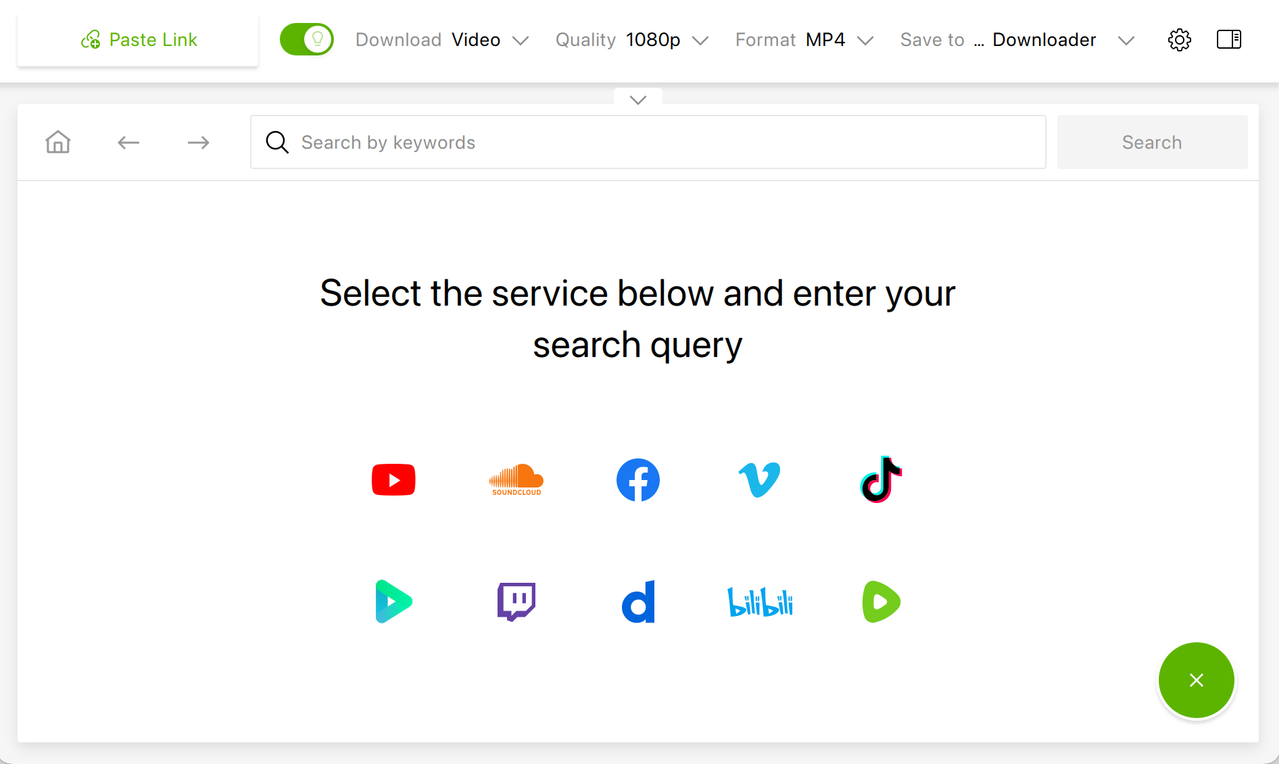
4K Video Downloader Plus is currently at version 26.3.3, released September 17, 2026, with separate native builds for Apple Silicon and Intel Macs. Its feature set is built around depth on a smaller number of platforms:
- Platforms: macOS, Windows, and Ubuntu Linux, the same license logic works across all three
- Sites supported: YouTube, Vimeo, TikTok, Facebook, SoundCloud, Twitch, Bilibili, Dailymotion, and several others
- Video quality: up to 8K resolution where the source allows it, plus 3D and 360° video support
- Playlists and channels: full playlist and channel downloads, including YouTube Watch Later, Liked Videos, private playlists, members-only YouTube videos, and YouTube search-result batches
- Auto-downloads: subscribe to a YouTube channel inside the app and have new uploads saved automatically
- Subtitles: SRT downloads in more than 80 languages, available for a single video, an entire playlist, or a full channel, either embedded or as separate files
- Multilingual audio: dubbed YouTube audio tracks can be downloaded in the language they were published in
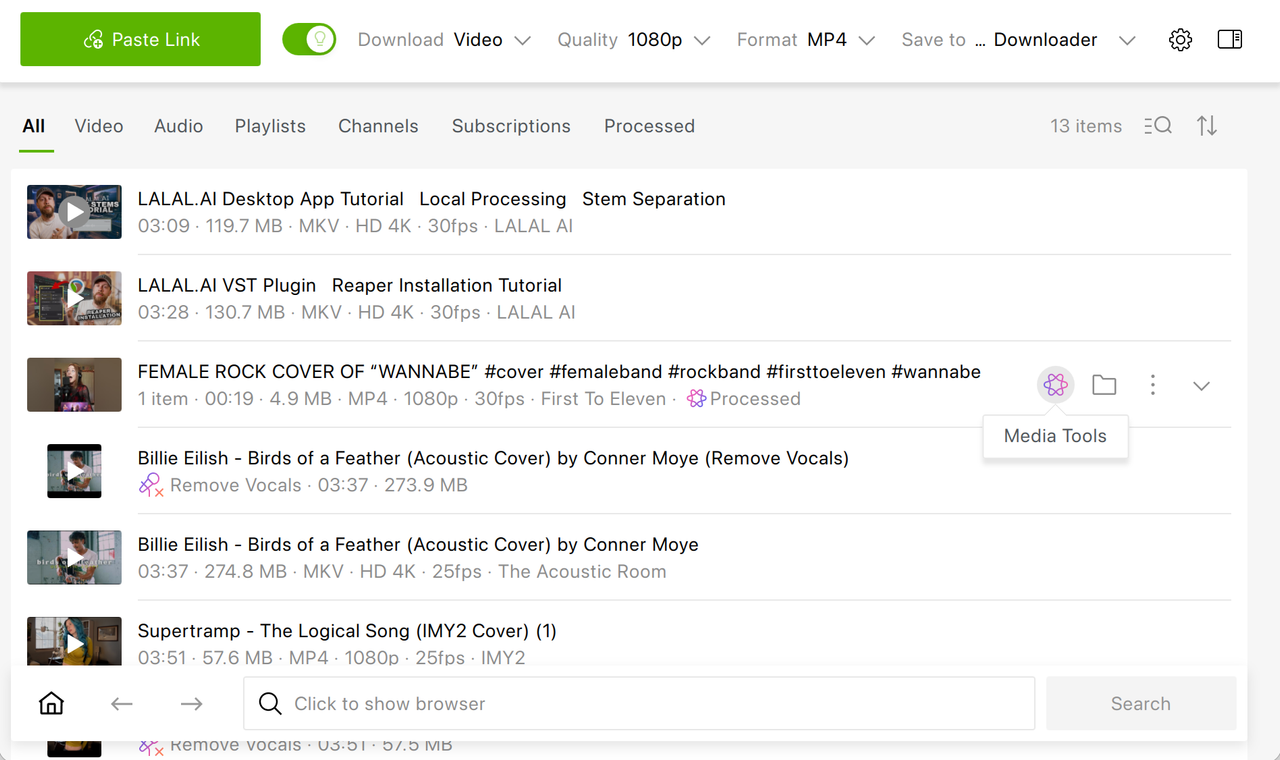
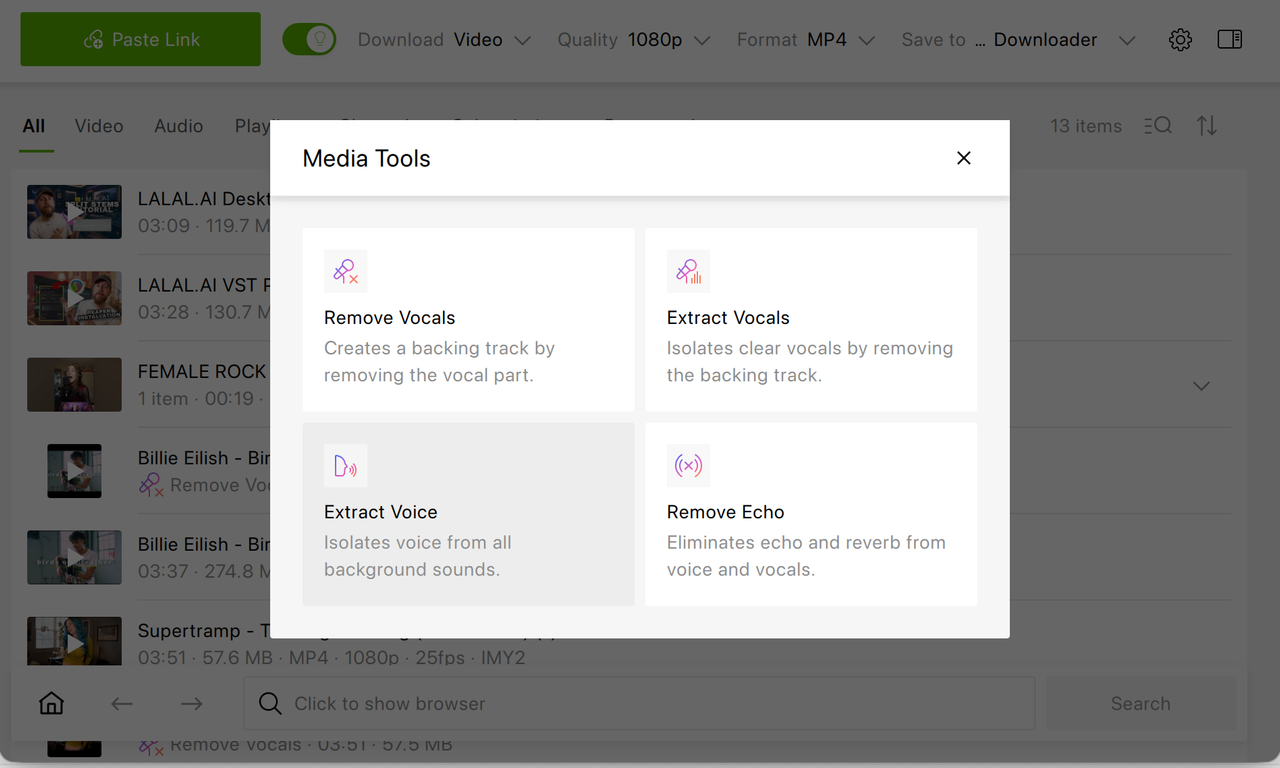
- Audio processing tools: vocal removal and isolation, background-noise separation, and echo reduction, built directly into the app
- Access tools: a built-in browser for logging in to gated content, plus a built-in proxy for bypassing geo-restrictions
- Pricing: a free Starter tier with a daily download cap, a $15/year Lite plan, a $25 lifetime Personal license, and a $45 lifetime Pro license that unlocks limitless downloads, audio processing tools, auto-subscriptions.
Feature Comparison Table: 4K Video Downloader Plus vs. Downie
| Criterion | 4K Video Downloader Plus | Downie |
|---|---|---|
| Supported OS | macOS, Windows, Linux | macOS only |
| Max. resolution | Up to 8K | Up to 4K |
| Total sites supported | ~10–12 major platforms | 1,000+ sites |
| Playlist / channel downloads | Yes, incl. Watch Later, Liked, private playlists, search results | Basic batch downloads via URL list |
| Auto-download new uploads | Yes, in-app channel subscriptions | Not available |
| Subtitle downloads | 80+ languages, SRT, batch-capable | Yes, but only one subtitle file per download |
| Dubbed / multilingual audio tracks | Yes | Yes (allows you to choose a track before downloading) |
| Built-in audio tools | Vocal removal/isolation, echo reduction | Not available |
| Format conversion | Built into the app | Requires separate Permute app |
| Geo-restriction bypass | Built-in proxy | Not available |
| Entry price | Free (Starter tier) | $19.99 one-time |
| Full-feature lifetime price | $45 (Pro) | $19.99 (current major version only) |
Which App Handles YouTube Playlists and Channels Better on Mac?
This is where the two apps diverge most sharply. Downie treats a playlist as a list of individual links to process one after another, which is functional, but it wasn’t designed around YouTube’s account-level features. 4K Video Downloader Plus, by contrast, can pull an entire channel, a Watch Later queue, a Liked Videos list, search results, or even a private playlist in a single action, and it can watch a channel for new uploads and grab them automatically.

Subtitles and Multilingual Audio: Where Downie Falls Short
Language support is another area where the gap is concrete. 4K Video Downloader Plus downloads subtitles in more than 80 languages (embedded in videos or as separate SRT files, for a single video or for an entire playlist) and can also save YouTube’s auto-dubbed audio tracks in the language they were published in. That combination matters for language learners, researchers working with foreign-language source material, and anyone localizing content for a global audience.
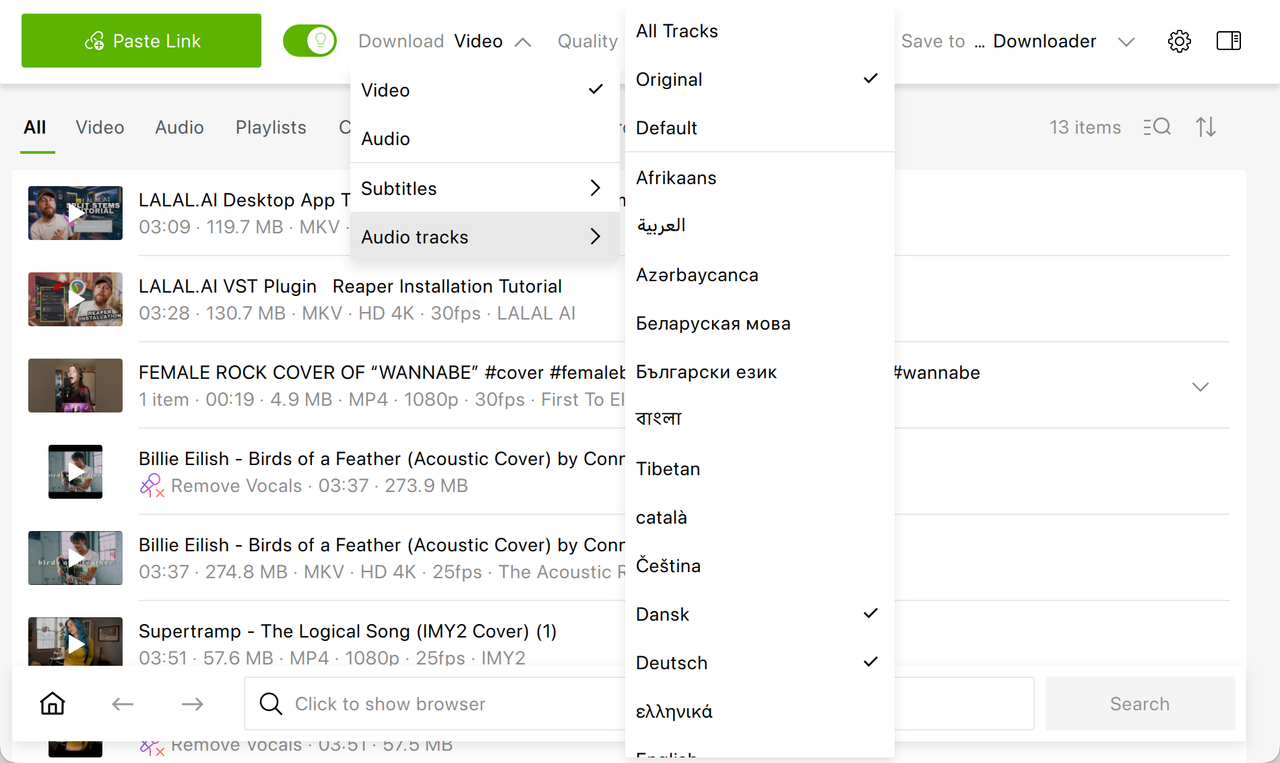
Downie allows you to select an audio track right when you drag and drop a YouTube video link but it doesn't allow you to pick multiple dubbed tracks and subtitles at once.

Audio Processing Tools: A Feature Downie Doesn’t Offer
4K Video Downloader Plus Pro tier includes Media Tools, such as vocal removal and isolation, background-noise removal, and echo reduction, applied directly to downloaded files. That’s useful for anyone extracting a clean instrumental, isolating a speaker’s voice from a noisy recording, cleaning up a lecture or vlog before archiving it. Downie has no built-in audio processing of this kind; any comparable cleanup would require exporting to a third-party audio editor.
Cross-Platform Access: Why Mac-Only Software Is a Limitation in 2026
Downie’s biggest structural limitation isn’t a missing feature; it’s the fact that it only exists on macOS. If you switch between a Mac and a Windows PC, share a household with mixed devices, or simply want your download history and settings to translate across machines, Downie can’t follow you there. 4K Video Downloader Plus runs on macOS, Windows, Ubuntu, and has an Android version, which makes it the more future-proof option for anyone who isn’t permanently locked into a single operating system.
Site Coverage: Downie’s One Clear Advantage
To be fair to Downie, it does win outright on one measure: raw site coverage. Its list of more than 1,000 supported websites dwarfs the roughly dozen major platforms that 4K Video Downloader Plus targets.
Pricing Compared: One-Time Fee vs. Flexible Lifetime Tiers
On paper, Downie's $19.99 one-time license looks like the cheaper deal, and for a Mac user who only wants the current major version with no add-ons, it is. But that price buys a narrower feature set, and full post-processing requires buying Permute separately. 4K Video Downloader Plus starts free (and this plan remains free forever), with a Lite plan at $15/year for those who prefer a low up-front cost, and lifetime licenses at $25 (Personal) and $45 (Pro) that unlock audio processing tools, auto-subscriptions, and no simultaneous-download limits without any recurring renewal. For most YouTube-focused users, the free tier or the $25 Personal license already covers more ground than Downie’s paid version does.
Ready to try it yourself?
Download 4K Video Downloader Plus for free and see how playlist, subtitle, and audio tools compare on your own Mac.
Download 4K Video Downloader PlusWhich Should You Choose: Downie or 4K Video Downloader Plus?
Choose Downie if your downloading habits are spread across hundreds of small, varied websites and YouTube is just one stop among many, you’re already comfortable pairing it with Permute for conversion, and a single $19.99 payment for the current version fits your budget better than a subscription or lifetime tier.
Choose 4K Video Downloader Plus if YouTube is where most of your downloading happens: playlists, full channels, subtitles in specific languages, or dubbed audio tracks, and you want that depth alongside built-in audio cleanup, geo-restriction bypass, and the flexibility to use the same license on a Windows PC or Linux machine as well as a Mac. For that use case, which covers the majority of everyday YouTube downloading on a Mac, 4K Video Downloader Plus is the more complete tool in 2026.
Frequently Asked Questions
Is Downie still able to download YouTube videos in 2026?
Yes. Downie 4.13 continues to support YouTube downloads, though some users have reported short-lived instability in recent builds after YouTube updates its video player. The developer typically resolves these issues within one to two weeks through regular updates.
Does Downie support 8K video downloads?
No. Downie supports resolutions up to 4K on YouTube. 4K Video Downloader Plus supports resolutions up to 8K where the source video is available at that quality.
Is 4K Video Downloader Plus free to use?
Yes, a free Starter tier is available with a daily download limit. Paid tiers start at $15/year (Lite) or $25 lifetime (Personal), with a $45 lifetime Pro license unlocking audio processing tools and channel auto-subscriptions.
Which app is better for downloading an entire YouTube playlist or channel on Mac?
4K Video Downloader Plus is built specifically for this: it can download full playlists, entire channels, Watch Later queues, Liked Videos, private playlists, members-only videos, and can auto-download new uploads from subscribed channels. Downie handles playlists as a list of individual links without these YouTube-specific batch features.
Does either app work on Windows or only on Mac?
Downie is macOS-only. 4K Video Downloader Plus runs on macOS, Windows, and Ubuntu Linux under the same license.
Published Sept. 22, 2026
 SHARE ON TWITTER


Thanks for feedback
Your comments will appear here shortly. Please spread the word about us in social networks.