



A YouTube subtitle downloader is an app or online service that saves a video's subtitles or closed captions as a standalone file (SRT, VTT, SSA, TXT, and others) on your device. Downloading subtitles alongside a video is useful for language learning, repurposing content, improving accessibility, facilitating translation, and taking quick notes or skimming through the text without watching the full video.
Best YouTube Subtitle Downloaders in 2026: Quick Comparison
| Tool | Multi-Language Download | Output Formats | Platform | Playlist Support | Command-Line Required |
|---|---|---|---|---|---|
| 4K Video Downloader Plus | ✔ | SRT | Windows, macOS, Linux | ✔ | ✖ |
| yt-dlp | ✔ | SRT, VTT | Windows, macOS, Linux | ✔ | ✔ |
| DownSub | ✖ (one at a time) | SRT, TXT | Browser (no install) | ✖ | ✖ |
| SubEasy | ✔ | SRT, VTT, ASS | ,Browser (no install) | ✖ | ✖ |
| DownloadYouTubeSubtitles (extension) | ✖ (one at a time) | SRT, VTT, TXT | Browser extension (Chrome) | ✖ | ✖ |
4K Video Downloader Plus: Best Overall Option
4K Video Downloader Plus is the flagship app from 4K Download, a cross-platform video downloader compatible with Windows, macOS, and Ubuntu, which even has a mobile version for Android. It downloads the YouTube video together with its subtitles in one pass in SRT format, in one or several languages at once (while supporting more than 80 languages), so you don't need a separate subtitle tool.
4K Video Downloader Plus recognizes three subtitle types:
- Author-uploaded: written and uploaded by the creator
- Auto-generated: YouTube's speech-to-text transcription, labeled "Language – transcribed" in-app
- Auto-translated: a machine translation of an existing subtitle track, labeled "Language – auto-translated", available only for widely spoken languages and only when nothing higher-quality exists
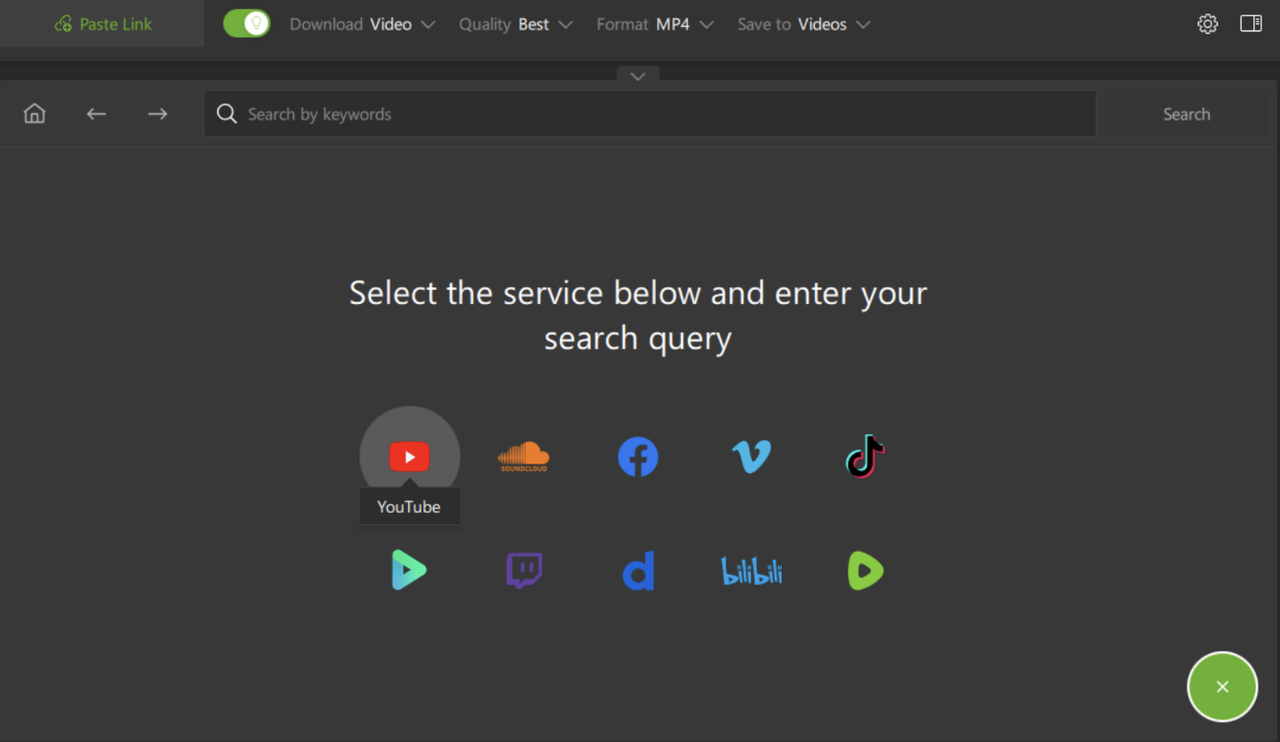
In addition to subtitle downloading, you can use 4K Video Downloader Plus for individual videos, full YouTube playlists, channels, YouTube search results, as well as private and members-only videos. The app lets you choose the resolution, format, output folder, and subtitle language. One of the standout features of the app is its in-app browser, which allows you to find and download subtitled videos without leaving the app.
The main 4K Video Downloader Plus features:
- Downloads the video and its subtitles together, in multiple languages
- Saves subtitles alongside the video as a separate SRT file
- Supports 720p, 1080p, 4K UHD, and 8K UHD, depending on the source video
- Downloads individual videos, full playlists, and even entire YouTube channels
- Lets you pick a downloaded video's format, frame rate, codec, quality, and output folder
- Supports YouTube and other platforms, including Vimeo, Twitch, Bilibili, Dailymotion, Facebook, TikTok, and others
- Runs on Windows 11+, macOS 12+, Ubuntu 22.04 64-bit (GNOME) or newer, and Android
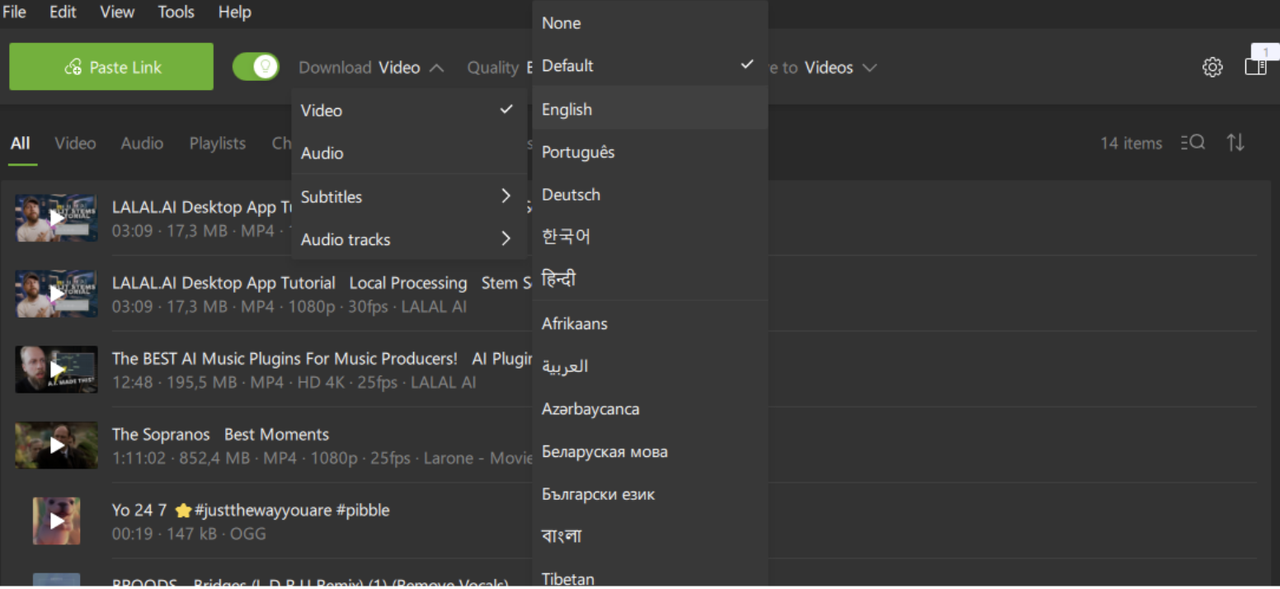
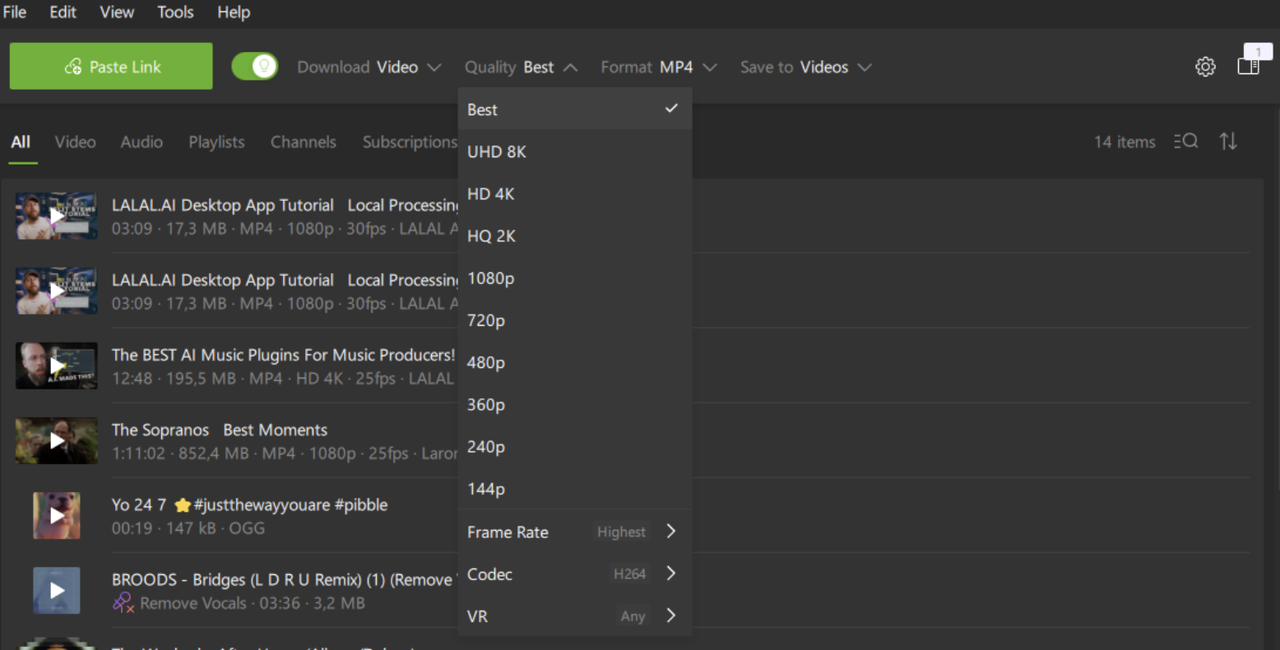
Free vs. paid: Subtitle downloading works in the free version, but it's capped at ten downloads a day, a limit that disappears once you upgrade. Lite and Personal let you run three downloads at once and add support for private videos. Pro raises that to seven simultaneous downloads, allows commercial use, and adds extras like multi-language audio and built-in audio processing. It also lets you subscribe to YouTube channels and playlists, so new uploads are downloaded automatically as soon as they appear.
How to Download YouTube Subtitles with 4K Video Downloader Plus
To embed subtitles directly into the video file (so playback doesn't depend on a separate file), do the following:
-
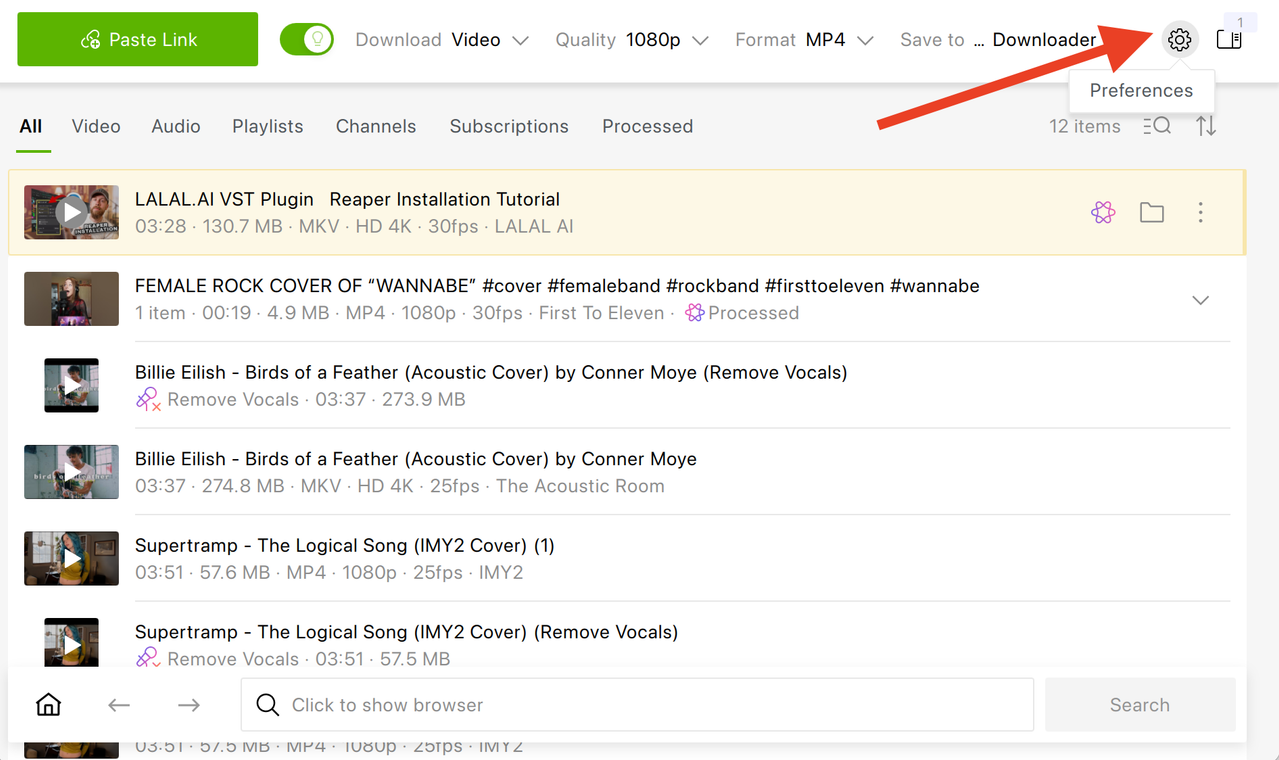
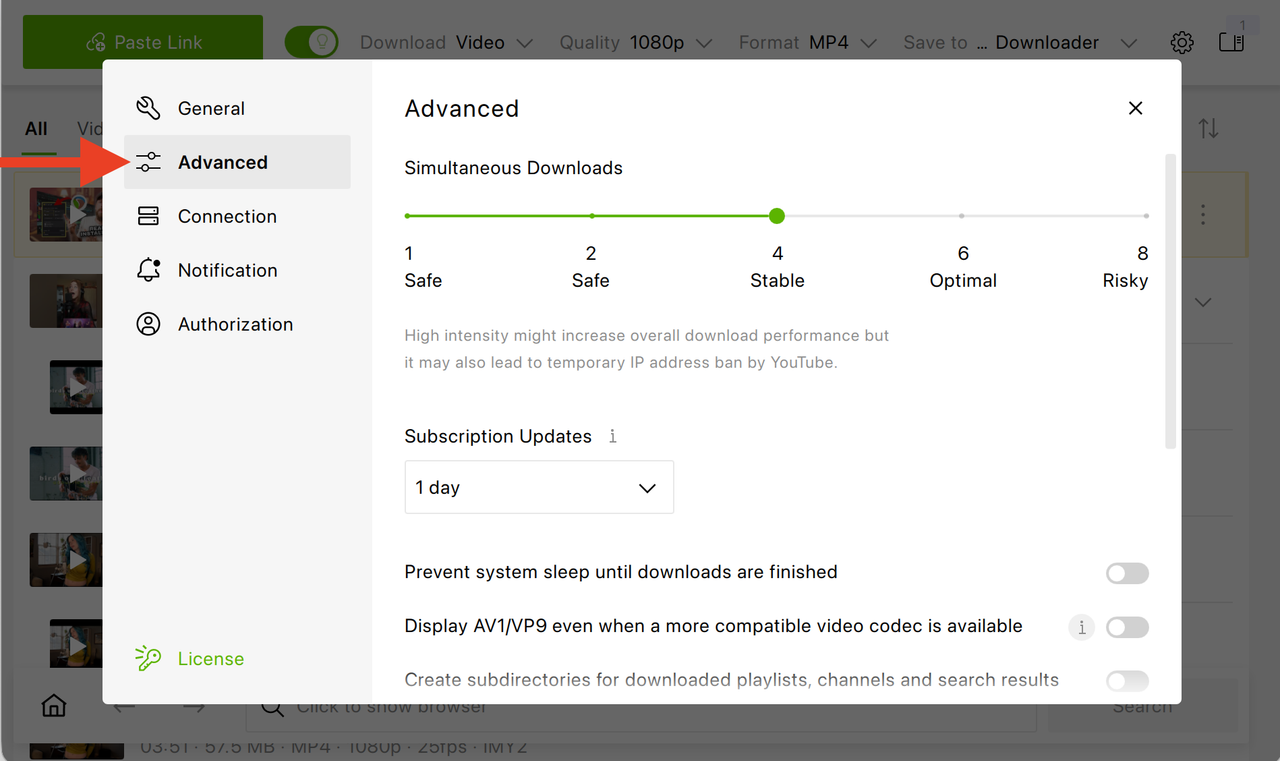
Enable embedded subtitles Open 4K Video Downloader Plus, then head over to Tools → Preferences → Advanced and enable Embed subtitles if possible.
-
Turn off Smart Mode Turn Smart Mode off if it's on.
-
Paste the video link Copy the link of a video that has CC available and click the Paste Link button.
-
Select subtitle languages In the download window, click Subtitles and select one or more languages.
-
Click Download Play the file in VLC or Media Player Classic and switch tracks from the Subtitle menu.


yt-dlp: Best Open-Source Option for Experienced Users
yt-dlp is a free, open-source, command-line YouTube downloader and the most actively maintained one available in 2026. It can download manual and auto-generated subtitles in any language YouTube offers, in various formats (including SRT or VTT), with or without the video itself. It's completely free and has no ads, but it does require some experience and time to get used to.
What yt-dlp does:
- Downloads subtitles only, video only, or both in a single command
- Supports every subtitle language and format YouTube exposes, including auto-generated captions
- Allows you to determine the subtitle file format, such as SRT or VTT
- Handles playlists and channels in one batch command
- Embeds subtitles into the video file automatically if desired
- Runs on Windows, macOS, and Linux
The main drawback is that yt-dlp has no graphical interface in the core project, so it requires experience with the command line. Third-party GUIs exist for users who prefer a visual interface.
DownSub: Best Lightweight Browser Option
DownSub is a free, browser-based tool built specifically for subtitle extraction, with no installation or account required. Paste a YouTube URL, pick a language, and download the file directly to your device.
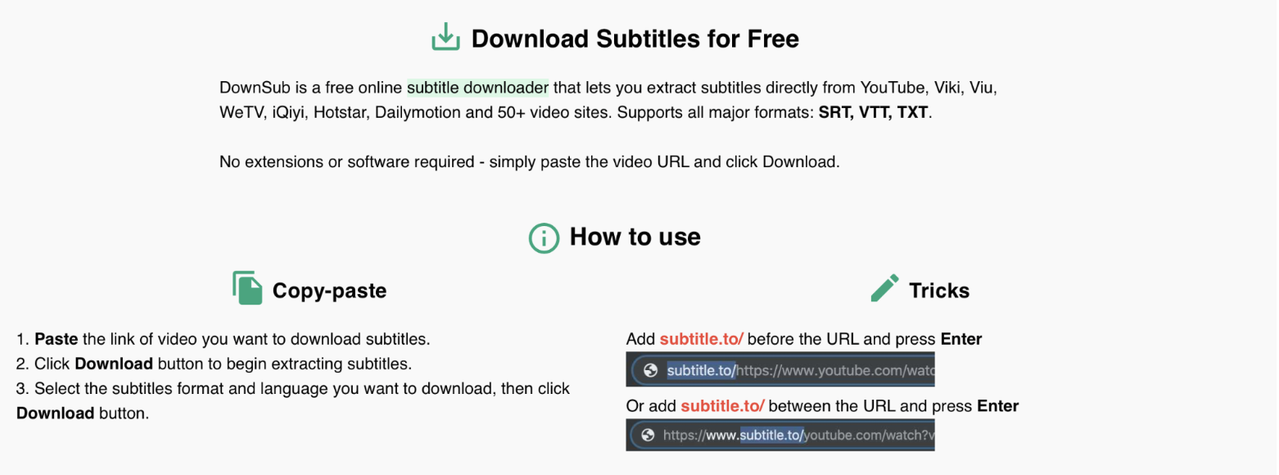
There are two ways to download a subtitle file: you can either paste a link directly on the website or add subtitle.to/ before the URL.
A review on Wondershare highlights the tool's straightforward approach compared to other subtitle sites. Apart from YouTube, it works across multiple video platforms, such as Vlive, Viki, and VIU, and installs no unwanted extra software. DownSub's scorecard rates it highly on legitimacy and safety.
What DownSub does:
- Downloads subtitles in all major formats: SRT, VTT, TXT
- Requires no software install or sign-up
- Works on any device with a browser
- Focused purely on subtitles: no video downloading, editing, or AI features
DownloadYouTubeSubtitles: Best Browser Extension
DownloadYouTubeSubtitles is a free Chrome extension that adds a small button directly under the YouTube video player. After you click it, it jumps straight to the list of available subtitles for that video, ready to download. Alternatively, you can paste a link on their website to download subtitles.
What DownloadYouTubeSubtitles does:
- Adds a one-click subtitle button below the YouTube player itself
- Supports bilingual subtitles for language learners
- Downloads subtitles as SRT, VTT, or TXT
- Supports native spoken captions as well as auto-translated subtitles
- Free, with unlimited downloads
- Installs once as a Chrome extension, then works on every YouTube video you open
SubEasy: Best Browser AI Option
SubEasy is a browser-based subtitle tool that adds AI features on top of extraction, including translation and summarization. The workflow is straightforward: paste a link, choose a format (SRT, VTT, or ASS), and export subtitles the tool will generate. Alternatively, you can open the subtitles in SubEasy's workspace to edit or summarize them.
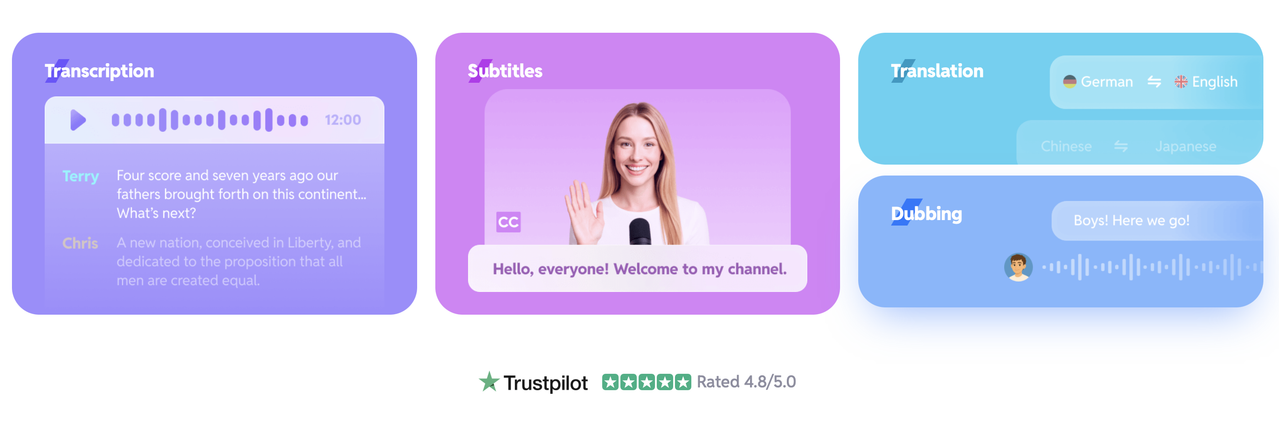
AIChief rates SubEasy highly for transcription and subtitling and points to its accuracy and broad language support, plus a daily allowance of free transcripts with no credit card needed for testing. According to their review, users also enjoy the animated caption styles, context-aware translation, studio-quality AI dubbing, and voice-swapping.
What SubEasy does:
- Generates subtitles in SRT, VTT, or ASS
- Offers AI-powered translation into 50+ languages
- Provides an AI summary of the video content
- Browser-based, no installation required
- Erases watermarks, if needed
How to Choose the Right YouTube Subtitle Downloader
Want to casually download subtitles and the video in multiple languages?
Use 4K Video Downloader Plus. It's the only tool on this list that pulls several subtitle languages from one video in a single pass and gives you an in-app browser to find content without leaving the app.
Need to download entire channels or hundreds of videos with subtitles?
Select 4K Video Downloader Plus. It doesn't need any complicated setup or command-line experience. The paid plans have no download limits and no ads, and are extremely good at batch downloading.
Just need one subtitle file right now?
DownSub works for a single quick download without installing anything on your computer. Just paste the link, pick a language, and download.
Want a button built right into the YouTube page?
DownloadYouTubeSubtitles (Chrome extension) adds a one-click button under every video you watch, so there's no copying links back and forth.
Want subtitles plus translation or an AI summary?
SubEasy bundles those extras in, though free use is limited. This AI tool generates subtitles directly from the video rather than downloading YouTube's, and also offers other AI features.
Need a simple and reliable tool?
4K Video Downloader Plus is the best and most reliable option, especially with its forever-free plan and the many advantages of its paid plans.
Frequently Asked Questions
Is 4K Video Downloader Plus free for subtitle downloads?
Yes. Subtitle downloading is included in the free plan, no credit card or subscription is required.
Can I download subtitles in more than one language at once?
Yes, with 4K Video Downloader Plus you can. When using Smart Mode, head over to the Subtitles section and select multiple languages before pasting the link. If Smart Mode is off, select the required subtitle languages after pasting the link in the Manual Download window. Most browser-based tools only let you pick one language per download.
Can I get subtitles without downloading the video?
Yes, with yt-dlp (using --skip-download), DownSub, or SubEasy. However, SubEasy generates subtitles which you can then export as a file, it doesn't download them per se. 4K Video Downloader Plus focuses on downloading the video with subtitles attached or alongside it.
Do these tools work with auto-generated (automatic) captions, not just uploaded subtitles?
Yes, for videos where YouTube's automatic captions are enabled, both 4K Video Downloader Plus and yt-dlp can retrieve them, not just manually uploaded subtitle tracks.
What subtitle format should I use?
SRT is the standard choice for editing software and most video players. VTT is common for web-based/HTML5 players. TXT is best for reading or note-taking without timestamps.
For most users, 4K Video Downloader Plus is the best YouTube subtitle downloader in 2026: it saves the video and subtitles in several languages in one pass, handles playlists and channels, and works on Windows, macOS, Linux, and Android with no command line. yt-dlp suits experienced users who want full control, while DownSub and the DownloadYouTubeSubtitles extension cover quick one-off subtitle grabs.
Published Sept. 24, 2026
 SHARE ON TWITTER


Thanks for feedback
Your comments will appear here shortly. Please spread the word about us in social networks.