




TL;DR: Copy the embedded Vimeo video link, paste it into 4K Video Downloader Plus with the Paste Link button, pick the quality and format, and click Download. The steps are identical on every desktop system the app supports. Since Vimeo’s own Download button never appears inside an embedded player, a dedicated downloader is the most practical route for videos you have permission to save.
Why Embedded Vimeo Videos Are Hard to Save
If you’ve found a great webinar or course lesson on someone’s website that plays through a Vimeo player, naturally, you go looking for a download option. There isn’t one, and that’s by design.
Vimeo states plainly in its Help Center that a video watched in an embedded player on a different website can’t be downloaded. Its Download button only shows up on the video’s own page on vimeo.com, and only if the owner has turned downloads on. Owners on the Free plan can’t enable downloads at all.
On top of that, many site owners restrict playback to their own domain. If you copy the player link into a new tab, you’ll often get a privacy warning instead of the video. That’s why neither the browser’s right-click menu nor the vimeo.com Download button gets you anywhere.
The good news is that several tools can still pick up the video stream straight from the page. Below you’ll find every method that works in 2026, from the easiest to the most hands-on, with step-by-step instructions for each operating system.
Note: Download only videos you own or have permission to save. Respect the creator’s rights and the site’s terms of use.
Method #1: 4K Video Downloader Plus (Windows, macOS, Ubuntu)
4K Video Downloader Plus is the quickest way to save an embedded Vimeo video. You copy the Vimeo video link, paste it in the app, and the app tracks down the video by itself. The application is compatible with Windows 11 and macOS 12 or newer. On Linux, the app supports Ubuntu 22.04 64-bit (GNOME only) and newer.
How to Download an Embedded Vimeo Video Step by Step
Install the app. Download 4K Video Downloader Plus from the official website and run the installer for your operating system.
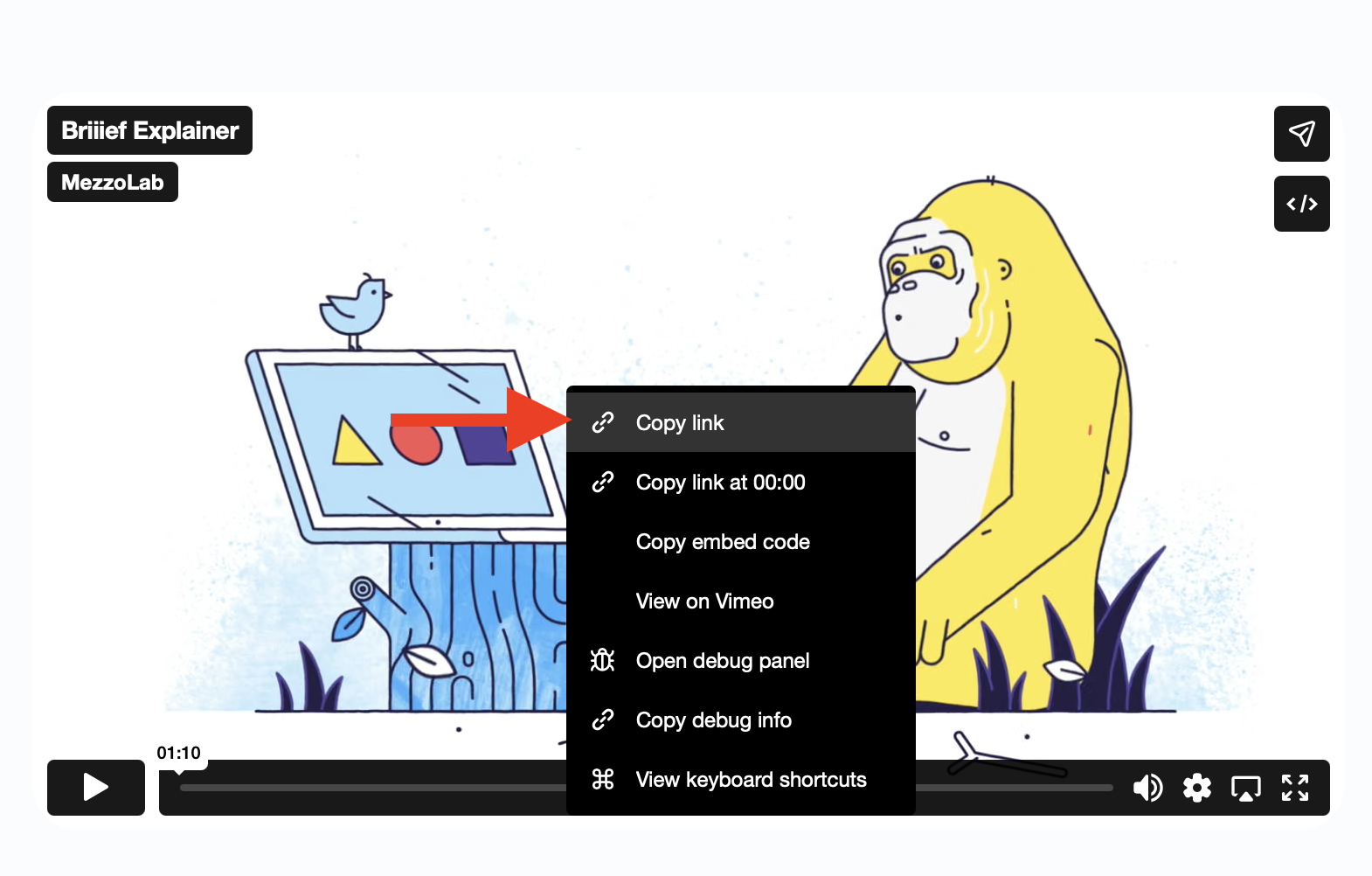
Copy the Vimeo video’s URL. Open the website with the embedded Vimeo player and copy its link. Use Ctrl+C on Windows or Ubuntu, and Command+C on a Mac.
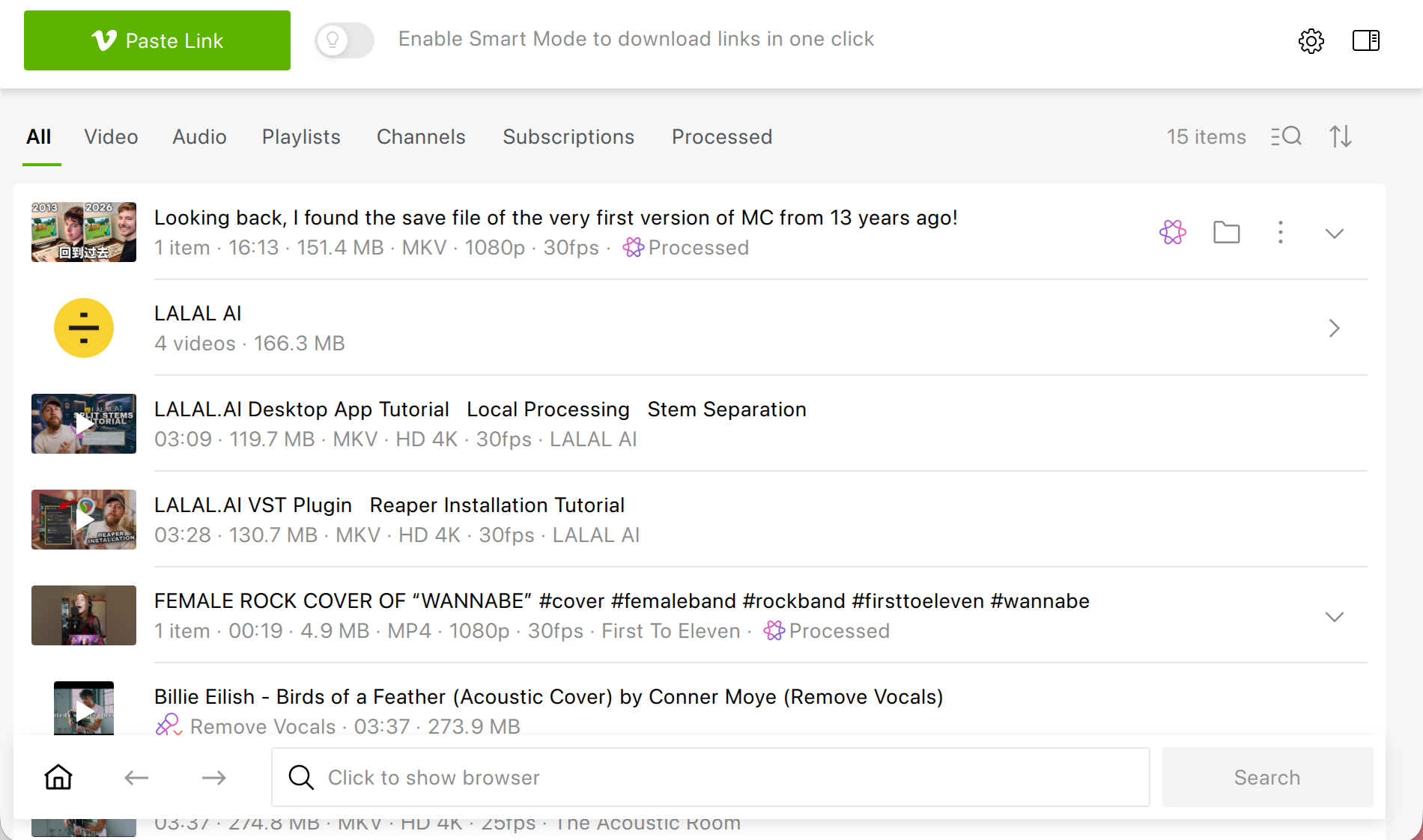
Paste the link. Launch 4K Video Downloader Plus and click the Paste Link button.
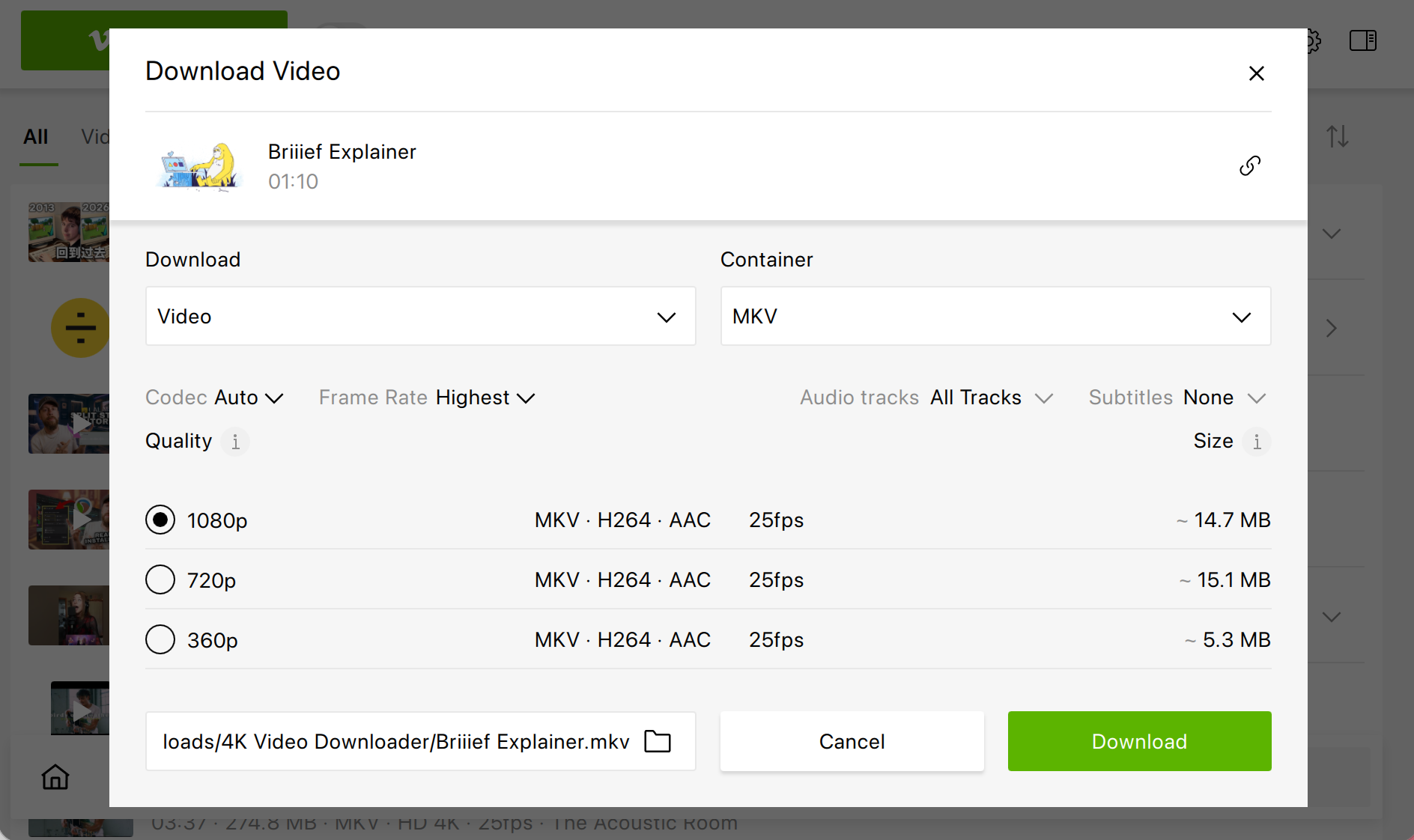
Choose quality and format. In the window that opens, select the resolution and file format you want. You can also change the output folder here.
Download the video. Click Download. The video will appear in the app’s list, ready to play or to open in its folder.
That’s the whole routine. It takes a few seconds, and it’s the same on every supported system.
Tips for Better Results & Smoother Workflow
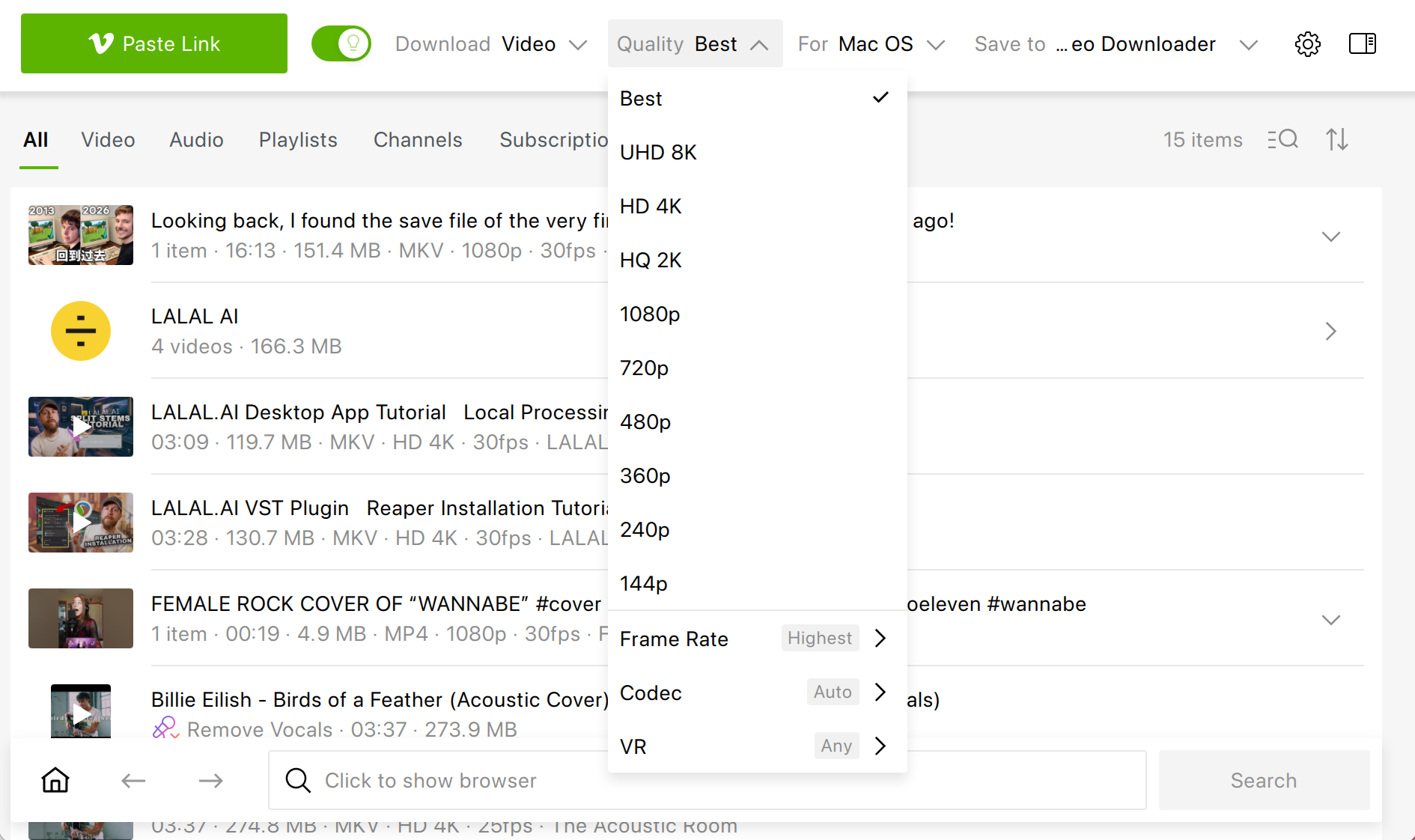
Turn on Smart Mode. If you save videos regularly, Smart Mode remembers your preferred quality and format, so the next download starts with a single click.
Keep the original quality. The app downloads in the best quality the player offers, up to 8K when the source has it.
How to Download Private or Password-Protected Embedded Vimeo Videos
If the video is private or locked with a password you’ve been given, use the app’s built-in browser instead of the Paste Link button. Downloading private content is a premium feature, so you’ll need a paid plan.
Open the built-in browser. Launch 4K Video Downloader Plus and click the round button in the bottom-right corner of the app window.
Paste the video link. Paste the link into the browser’s address bar and click Go.
Unlock the video. Enter the password you were given. If the video requires a Vimeo account instead, sign in through the same built-in browser.
Download the video. Click the Download button and select the format and quality. Then click Download once more.
Good to Know: How to Find the Vimeo Player Link in the Page Code
Every embedded Vimeo video lives at an address that looks like https://player.vimeo.com/video/123456789. Pulling that link out of the page won’t download anything by itself, but it’s the key that opens the door for the methods below just as it does with the 4K Video Downloader Plus method. It also tells you the video ID, which you can use if you want to check the video’s page on vimeo.com.
This way works on any desktop browser, whatever your operating system.
How to Open the Page Source
| Browser | Windows and Linux | macOS |
|---|---|---|
| Google Chrome | Ctrl+U | Option+Command+U |
| Microsoft Edge | Ctrl+U | Option+Command+U |
| Mozilla Firefox | Ctrl+U | Command+U |
Safari hides its developer features by default. Turn them on in Safari -> Settings -> Advanced by ticking Show features for web developers, then press Option+Command+U.
How to Extract the Player Link Step by Step
Open the page source. Go to the page with the embedded video and press the shortcut for your browser from the table above.
Search for the player. Press Ctrl+F (Command+F on a Mac) and type player.vimeo.com/video.
Copy the full link. Select everything from https to the closing quotation mark. If the link contains ?h= followed by letters and digits, keep that part: unlisted videos won’t load without it.
Clean it up. In page code, an ampersand inside a link is often written as
&. If your link contains&, replace it with a plain&before you paste it anywhere, or the link may not work.
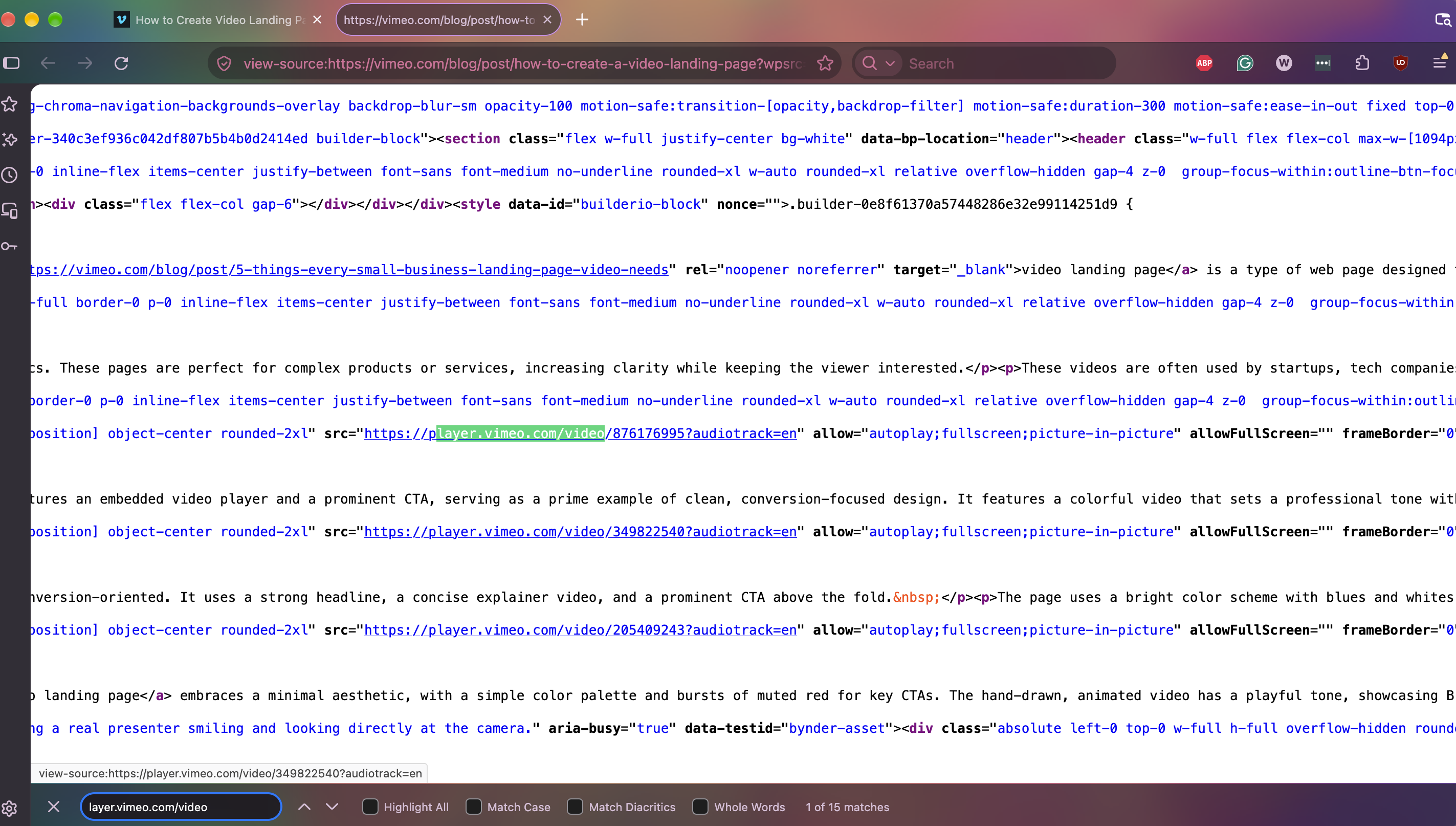
If the search finds nothing, the player is probably loaded by a script after the page opens. In that case, press F12 (Option+Command+I on a Mac) to open developer tools, switch to the Elements tab (Inspector in Firefox), and search there instead. That panel shows the page as it looks right now, iframes included.
Heads-up: Opening the player link in a new tab often shows a privacy message saying the video can’t be played there. That simply means the owner limited playback to their own website. Downloaders get around this by telling Vimeo which page the video came from, as you’ll see in Method 3.
Method #2: yt-dlp from the Command Line
yt-dlp is a free, open-source downloader that runs in a terminal. It doesn’t have any buttons or windows, but if you’re comfortable typing commands, it gives you fine-grained control over what you save. It also needs FFmpeg to merge separate video and audio streams into one file, so install both.
This approach works on every major desktop operating system, including Linux distributions beyond Ubuntu.
How to Install yt-dlp and FFmpeg
| System | Command |
|---|---|
| Windows (PowerShell) | winget install yt-dlp.yt-dlp Gyan.FFmpeg |
| macOS (Homebrew) | brew install yt-dlp ffmpeg |
| Ubuntu and Debian | sudo apt install pipx ffmpeg, then pipx install yt-dlp |
How to Download an Embedded Vimeo Video with yt-dlp
Open a terminal. On Windows, open PowerShell. On a Mac or Linux machine, open Terminal.
Try the page URL first. yt-dlp can scan a web page for embedded players on its own. Replace the example address with the page where the video is embedded:
yt-dlp "https://example.com/page-with-video"Add the referer if that fails. Take the player link you found with Method 2 and tell yt-dlp which page it belongs to. This is how you get past “this video can’t be played here” restrictions:
yt-dlp --referer "https://example.com/page-with-video" "https://player.vimeo.com/video/123456789"Pass your cookies for members-only pages. If the video sits behind a login you legitimately have, sign in to the site in your browser and add
--cookies-from-browser firefox(or the name of another browser) to the command.Find the file. yt-dlp saves the video to the folder your terminal is currently in, usually your home folder.
Keep it updated. Vimeo changes its delivery system often, and yt-dlp has to keep pace. In mid-2026, users on the project’s issue tracker reported that anonymous Vimeo downloads had stopped working until a fix arrived. If you see an error, update first: run yt-dlp -U, or upgrade it through the package manager you installed it with.
Method #3: Video Download Helper Browser Extension
Video Download Helper is a veteran browser extension that spots media playing on the current page, Vimeo players embedded on other websites included. It suits people who’d rather stay inside the browser, though it takes a bit of setup before the first download.
It works on Firefox, as well as Chromium-based browsers such as Chrome and Edge.
Install the extension. Add Video DownloadHelper from your browser’s official add-on store.
Open the page with an embedded Vimeo video. Find the video you want to download.
Open the extension if it’s not activated by default. Click on the Extensions icon in your browser and choose Video Download Helper.
Select the video from the list. The extension will show all the videos available to download from the page.
Click Downloadt. The extension will show all the videos available to download from the page.
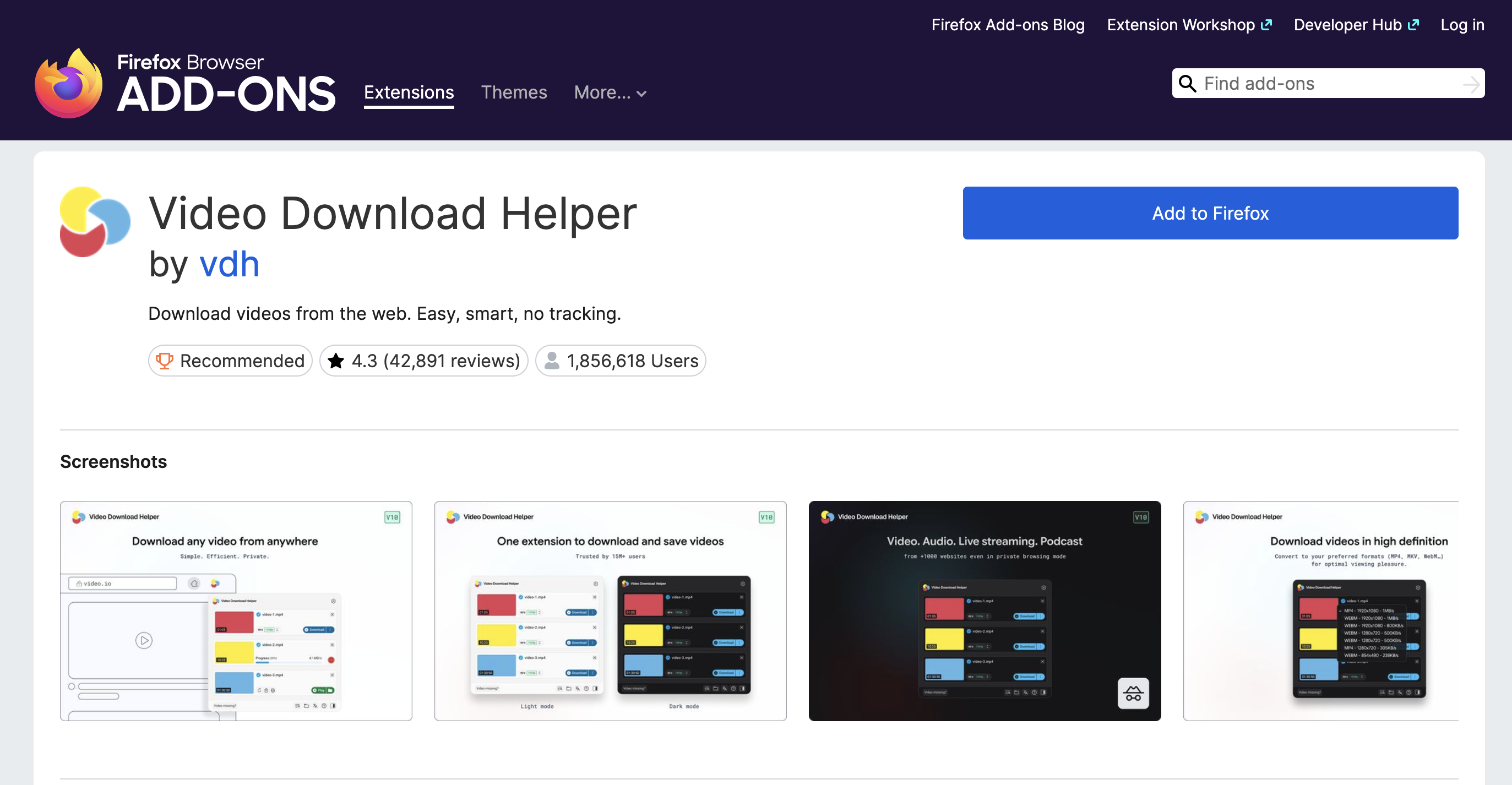
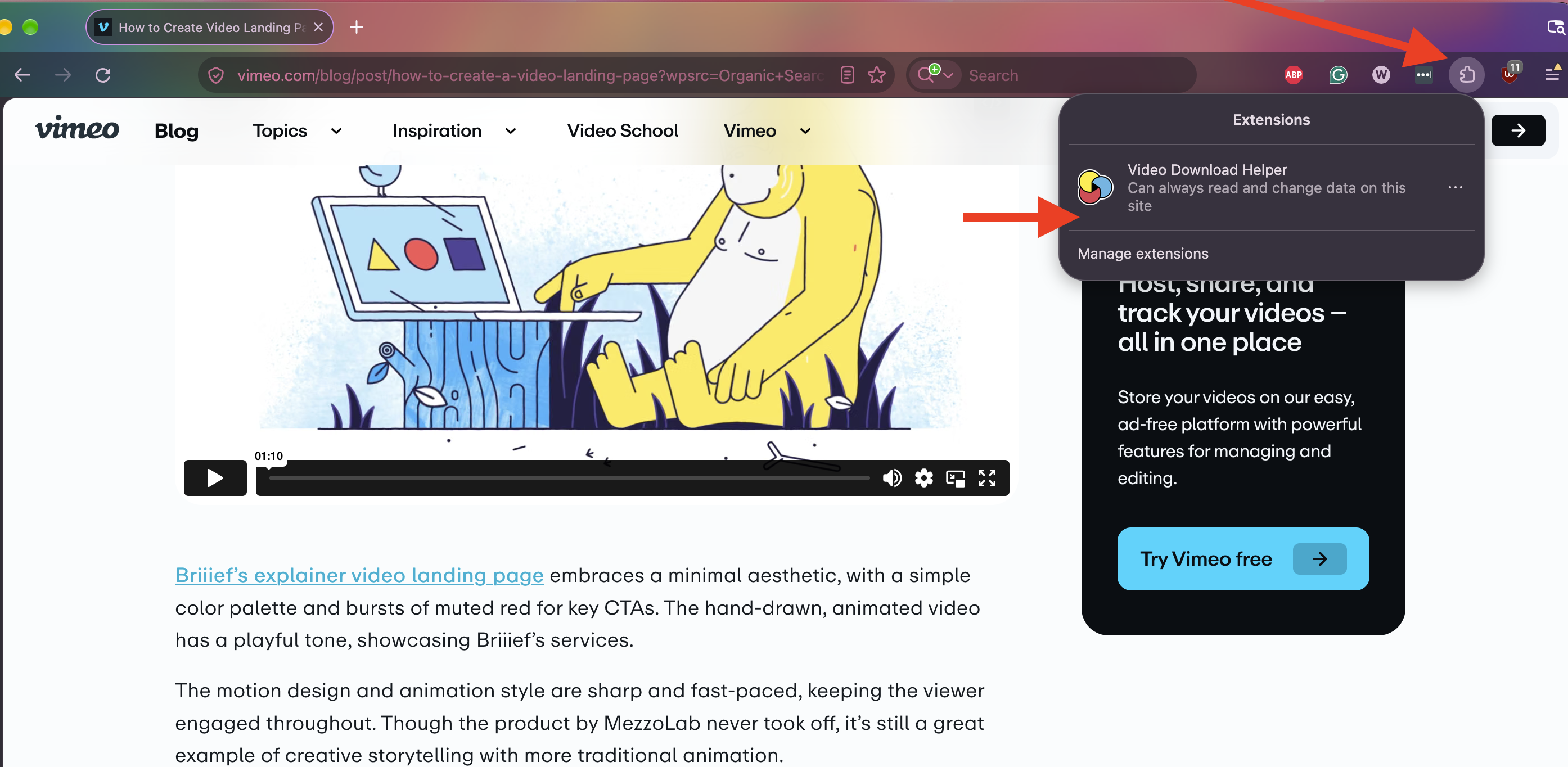
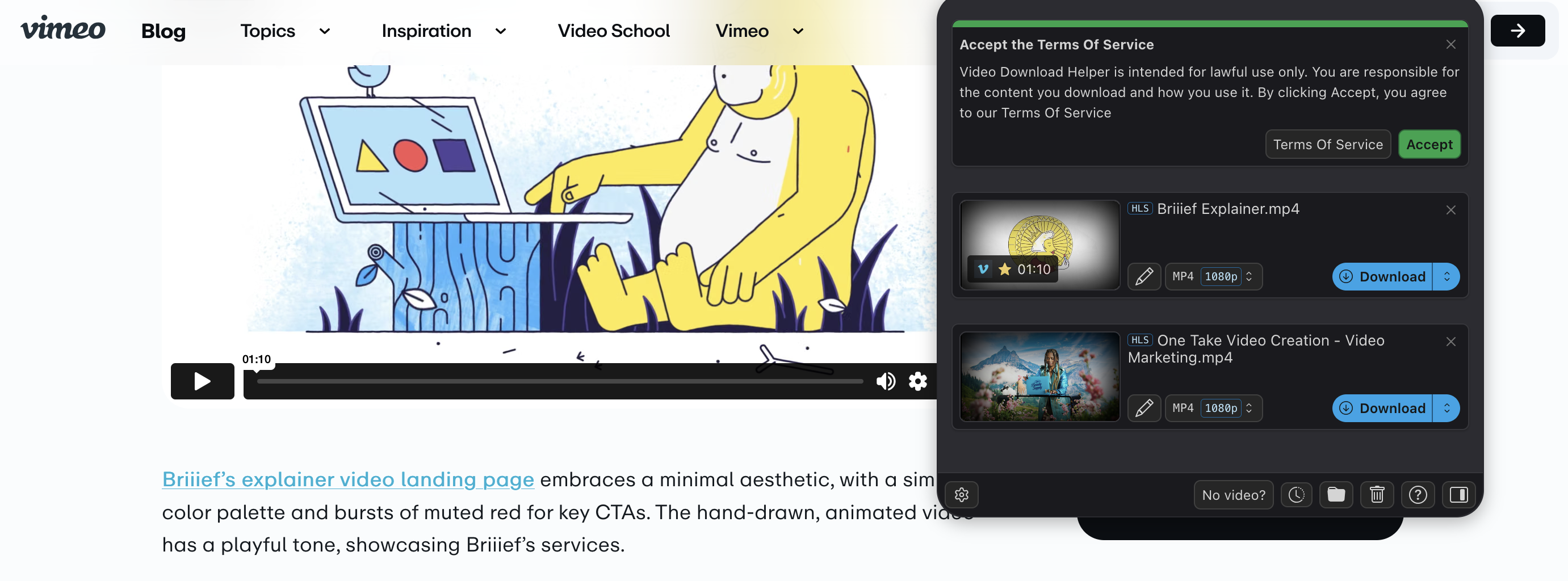
Browser stores tighten their rules for downloader add-ons from time to time, so the same extension may behave differently from one browser to another.
Method #4: Online Vimeo Downloaders
Web-based downloaders promise a no-install shortcut: paste a link, get a file. In practice, though, results with embedded videos are hit-and-miss. Many services only accept vimeo.com links and stumble over players that are locked to a specific domain.
Get the player link. Extract the player.vimeo.com address with Method 2.
Paste it into the service. Open the online downloader and paste the link into its input field.
Choose quality and save. Pick a resolution, if the service offers a choice, and download the file.
Tread carefully here. Free online downloaders often cap the resolution and come loaded with pop-ups or fake download buttons. Never install anything such a site pushes on you.
Method #5: Record Your Screen
When nothing else works, you can always capture the video as it plays. Screen recording is a last resort rather than a real download as it runs in real time, and the quality never exceeds what your screen shows. Pop-up notifications can sneak into the recording, too. Still, every operating system has a built-in recorder.
Windows 11
Open the recorder. Press Win+Shift+R to open Snipping Tool in recording mode.
Select the player. Drag a rectangle around the video and click Start.
Play and stop. Play the video in full, then click the stop button. The clip opens in Snipping Tool, and Windows saves it to the Videos\Screen Recordings folder by default.
macOS
Open the screenshot toolbar. Press Shift+Command+5.
Pick the recording area. Choose Record Selected Portion and frame the player, or record the entire screen.
Record and stop. Click Record and play the video. When it ends, click the stop button in the menu bar.
The built-in macOS recorder captures a microphone but not the sound your Mac plays. If you need the audio track, use OBS Studio, described below.
Linux (GNOME)
Start a screencast. Press Print Screen to open the capture toolbar and switch it to video mode.
Record the video. Select the area around the player and start recording. Then play the video.
Stop the recording. Click the red stop button in the top bar. GNOME saves the file to Videos/Screencasts.
Like its macOS counterpart, the GNOME recorder doesn’t capture system audio.
OBS Studio for Any Desktop System
OBS Studio is a free, open-source recorder for every major desktop system. Unlike the built-in tools, it records the sound your computer plays.
Add a source. In the Sources box, click + and add a Window Capture for your browser or a Display Capture for the whole screen.
Check the audio. Make sure the Desktop Audio meter in the Audio Mixer moves when the video plays.
Record. Click Start Recording and play the video to the end. Then click Stop Recording. The file appears in your Videos folder.
How to Save Embedded Vimeo Videos on iPhone and Android
Mobile systems keep a tight lid on browser downloads, so your realistic options on a phone come down to two: record the screen, or download the video on a computer and move it over.
iPhone and iPad
Open Control Center. Swipe down from the top-right corner of the screen. If you don’t see the Screen Recording button, add it in the Control Center settings.
Start recording. Tap Screen Recording and wait for the countdown. Then play the embedded video in Safari.
Stop and save. Tap the red indicator at the top of the screen and confirm. The recording lands in the Photos app.
Android
Open Quick Settings. Swipe down twice from the top of the screen and tap Screen record. On some phones, you may need to add the tile first.
Turn on device audio. Choose to record device audio so the video’s soundtrack ends up in the file.
Record and stop. Play the video, then stop the recording from the notification shade. The clip goes to your gallery.
The exact labels vary between phone makers, but every recent Android version ships with a built-in recorder.
The Better-Quality Option: Download on a Computer
For full resolution, download the video on your computer with 4K Video Downloader Plus (Method 1) and send it to your phone via AirDrop or a cloud drive. It takes a minute longer, but you get a proper video file instead of a screen capture.
Embedded Vimeo Download Methods Compared
If you just want the file with minimal fuss, start with 4K Video Downloader Plus. Reach for yt-dlp when you need scripting, and keep screen recording up your sleeve for the cases where nothing else gets through. Method 2 isn’t listed below, since it’s a helper step rather than a download method.
| Method | Platforms | Max quality | Audio included | Skill level | Best for |
|---|---|---|---|---|---|
| 4K Video Downloader Plus | Desktop (Windows, macOS, Ubuntu) | Source quality, up to 8K | Yes | Beginner | Everyday downloads from a page link |
| yt-dlp | All desktop systems | Source quality | Yes | Advanced | Automation and tricky embeds |
| Video DownloadHelper | Firefox and Chromium browsers | Source quality with the companion app | Yes | Intermediate | Staying inside the browser |
| Online downloaders | Any browser | Often capped | Yes | Beginner | Occasional one-off links |
| Built-in screen recorders | Desktop and mobile | Your screen resolution | Yes, except macOS and GNOME | Beginner | Last resort on any device |
| OBS Studio | All desktop systems | Your screen resolution | Yes | Intermediate | Screen recording with sound |
Troubleshooting Common Problems
The Downloader Finds No Video
Some sites load the player only after you accept cookies or click a preview image. Let the video start playing in your browser, then copy the page address again. If that doesn’t help, extract the player link through developer tools.
The Video Is Behind a Login
Tools can only reach what your account can see. Sign in to the site first, and in yt-dlp, add your browser cookies with --cookies-from-browser.
A Download That Used to Work Now Fails
Vimeo updates its player regularly, so the fix is almost always an update. Install the latest version of your downloader and try again.
The yt-dlp File Has No Sound
yt-dlp couldn’t find FFmpeg to merge the separate audio and video streams. Install FFmpeg (see Method 2) and run the command again.
The Screen Recording Comes Out Black
The video is most likely protected with DRM, which browsers deliberately hide from recorders. Protected videos like these can’t be saved with any of the methods above.
Is It Legal to Download Embedded Vimeo Videos?
It depends on who owns the video and what they allow. Saving your own uploads or videos the owner has allowed you to keep is generally fine. Downloading someone else’s work to re-upload or share it is a different story and can infringe copyright.
When in doubt, ask the creator or the site owner. And keep in mind that copyright rules differ from country to country, so this section is general guidance rather than legal advice.
Ready to Give It a Go?
Paste the video link into 4K Video Downloader Plus and save your first embedded Vimeo video today.
FAQ
Why is there no Download button on an embedded Vimeo video?
Vimeo doesn’t offer downloads inside embedded players. Its Download button appears only on the video’s page on vimeo.com, and only when the owner has enabled downloads on a paid plan.
How do I find the Vimeo link of an embedded video?
Double-click on the video to see the context menu and find the Copy link or open the page source with Ctrl+U on Windows or Linux (Option+Command+U in Chrome on a Mac) and search for player.vimeo.com/video. Copy the whole link, including the ?h= part if there is one.
Can I download embedded Vimeo videos on iPhone or Android?
Not directly from the browser. You can capture the video with the phone’s built-in screen recorder, or download it on a computer with 4K Video Downloader Plus and transfer the file to your phone for better quality.
Can I download private or password-protected embedded Vimeo videos?
Yes, as long as you have legitimate access to them. In 4K Video Downloader Plus, open the video in the built-in browser and enter the password or sign in. Then click Download. Private content downloads require a paid plan. In yt-dlp, sign in to the site in your browser and add --cookies-from-browser; for a password-protected Vimeo video, also add --video-password followed by the password you were given.
What quality can I get when downloading an embedded Vimeo video?
Dedicated downloaders save the stream in the best quality the player offers. 4K Video Downloader Plus goes up to 8K when the source provides it, while screen recordings are limited by your display’s resolution.
Does yt-dlp still work for Vimeo in 2026?
Yes, but it breaks from time to time when Vimeo changes its systems. If yt-dlp throws an error, update it to the latest version before trying anything else.
Published Nov. 12, 2026
 SHARE ON TWITTER


Thanks for feedback
Your comments will appear here shortly. Please spread the word about us in social networks.