



Yes, you can download most public YouTube videos without a Google account. No login is required to access or save publicly available content. However, age-restricted videos, private videos, and certain premium content require account authentication. Tools like 4K Video Downloader Plus let you paste any public YouTube URL and save it locally, no sign-in needed.
What's the easiest way to download YouTube videos without logging in?
Install 4K Video Downloader Plus, copy the video URL from your browser, click Paste Link in the app, choose your preferred format and quality, and click Download.
Are there limits to what I can download without an account?
Yes. Age-restricted videos, private videos, and members-only content require you to be signed in. Public videos — the vast majority of YouTube content — download without any account.
What "No Account Required" Actually Means on YouTube
YouTube distinguishes between three types of content access:
- Public videos — visible to anyone, no login needed, fully downloadable with third-party tools
- Unlisted videos — accessible via direct link, no login required, downloadable if you have the URL
- Private and age-restricted videos — require a YouTube/Google account to view and download
Stat: According to YouTube's own data shared in 2023, over 800 hours of video are uploaded to YouTube every minute. The overwhelming majority is public content.
For public and unlisted videos, tools like 4K Video Downloader Plus work without any account credentials. You simply paste the link, and the app handles the rest.
How to Download YouTube Videos Without a Google Account Using 4K Video Downloader Plus
4K Video Downloader Plus is a desktop application available for Windows, macOS, and Ubuntu. There's also a mobile version of 4K Video Downloader that is available to be used on Android devices. For public YouTube videos, no sign-in is required at any step.
- Download and install 4K Video Downloader Plus on your Windows, Mac, or Ubuntu device from 4kdownload.com.
- Open YouTube in your browser and navigate to the video you want to save.
- Copy the video URL from the address bar.
- Click the "Paste Link" button in 4K Video Downloader Plus.
- Select your preferred format and quality — options include MP4 and MKV in resolutions up to 4K and 8K.
- Click "Download" and wait for the file to save to your device.
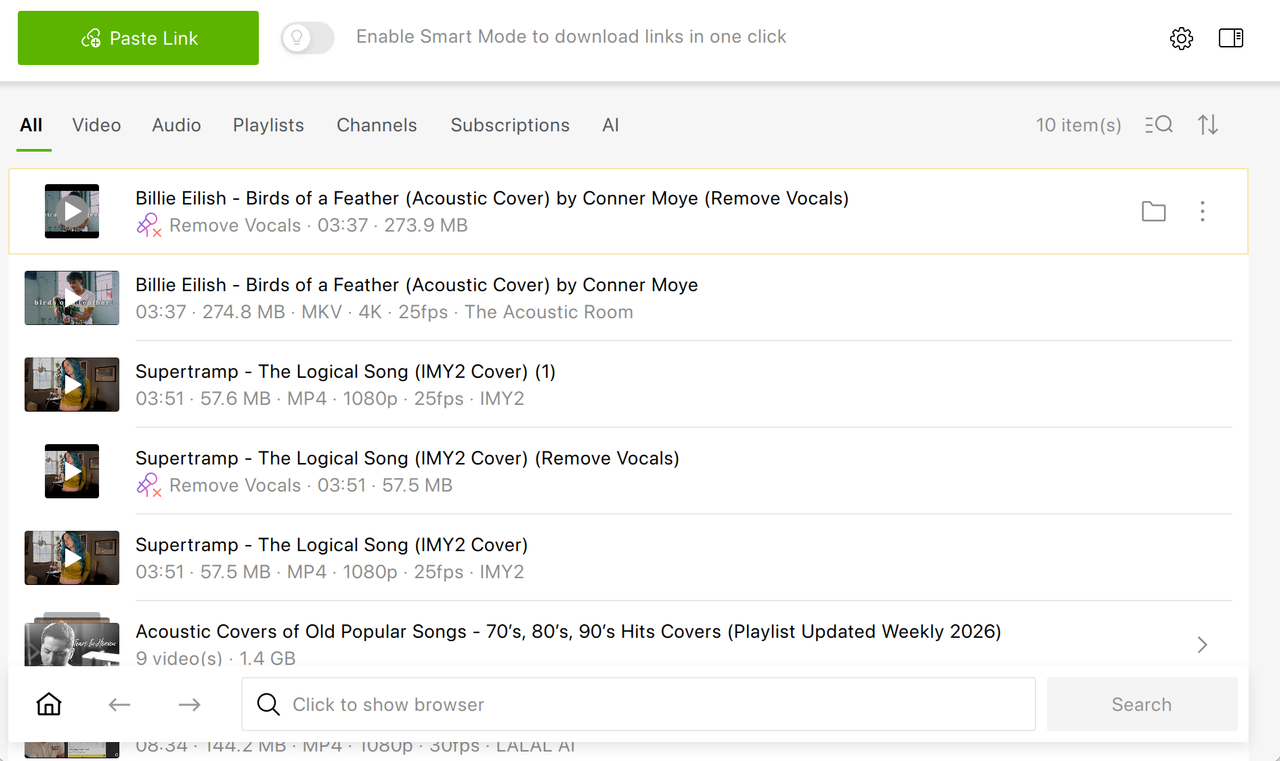
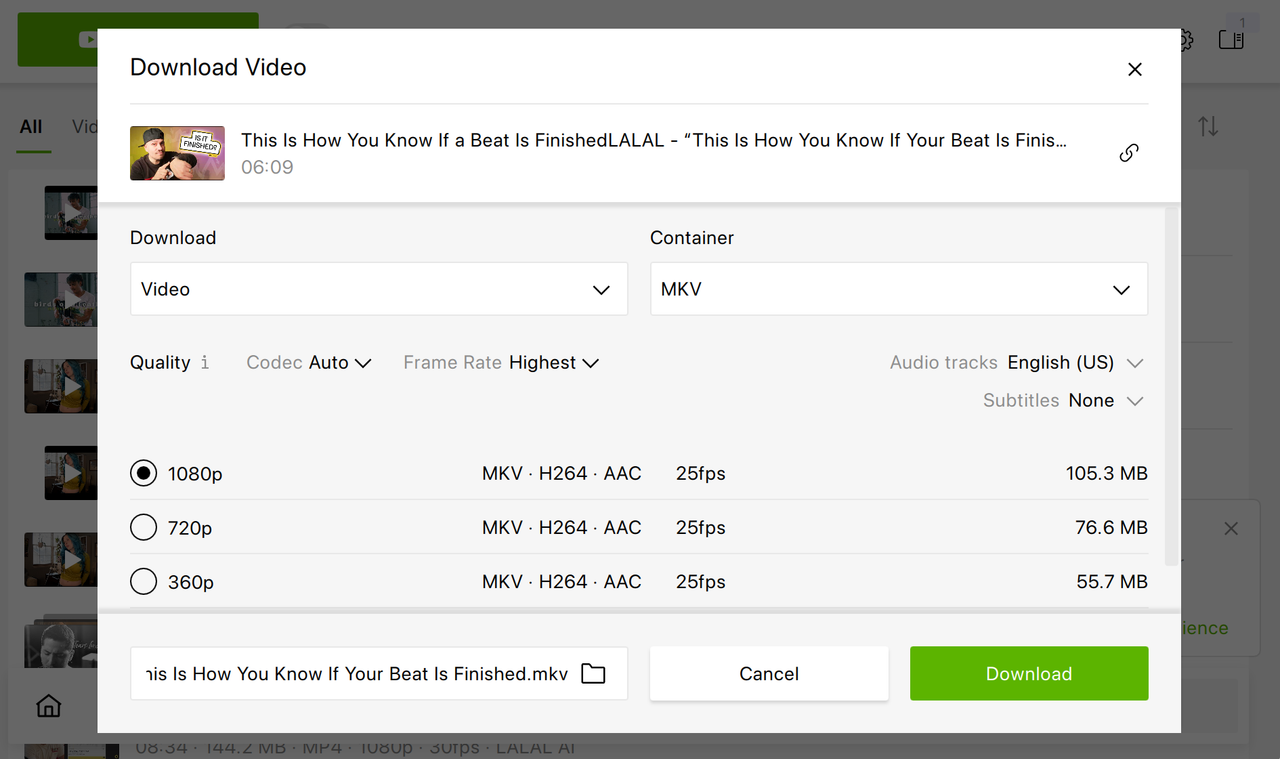
Alternatively, you can download YouTube videos without a Google account in the 4K Video Downloader Plus in-app browser. Simply open the built-in browser and click on the YouTube icon. The platform will open in 4K Video Downloader Plus as it usually does in your browser. All you have to do next is find the video, channel, or playlist you want to save and press Download.
What Types of YouTube Content Don't Require a Login to Download
| Content Type | Login Required? | Downloadable with 4K Video Downloader Plus? |
|---|---|---|
| Public video | ✖ | ✔ |
| Unlisted video (with link) | ✖ | ✔ |
| YouTube Shorts | ✖ | ✔ |
| Public playlist | ✖ | ✔ |
| Public channel | ✖ | ✔ |
| Private video | ✔ | ✔ (login in-app required) |
| Members-only content | ✔ | ✔ (login in-app required) |
For any private content, 4K Video Downloader Plus supports in-app login, which means that you authenticate once inside the app and can download normally from there, using your YouTube account credentials and thus having access to any content your account has access to.
Am I Allowed to Download YouTube Videos at All?
This is the legal context worth understanding before you download anything.
YouTube's Terms of Service state that users may not download content unless a download button or link is explicitly provided by YouTube itself. The only officially sanctioned download method YouTube offers is through YouTube Premium ($15.99/month), which saves videos for offline viewing within the YouTube app only and only for as long as your subscription is active.
That said, YouTube's enforcement focuses on platforms that distribute copyrighted content at scale, not individual users saving videos for personal offline use. Downloading public domain videos, Creative Commons-licensed content, or videos you uploaded yourself is generally considered low-risk and, in many jurisdictions, falls into a legal gray area rather than clear-cut infringement.
The safest, fully legal uses of 4K Video Downloader Plus without a Google account:
- Downloading your own uploaded videos (backup copies)
- Saving Creative Commons-licensed educational content
- Archiving public domain video material
- Downloading videos where the creator has explicitly given permission
Frequently Asked Questions
Can I download a YouTube playlist without a Google account?
Yes. 4K Video Downloader Plus supports one-click playlist downloading for public playlists with no login required. Paste the playlist URL the same way you would a single video link.
Can I download YouTube videos without an account on iPhone?
iOS doesn't have a native 4K Video Downloader Plus app. On iPhone, options include using a file manager app like Documents by Readdle with a browser-based YouTube download tool, or using the desktop version of 4K Video Downloader Plus to save files and transfer them.
What's the difference between unlisted and private YouTube videos?
Unlisted videos don't appear in search results but stream normally to anyone with the link; you don't have to log in, videos are fully downloadable. Private videos are restricted to the uploader and approved viewers only and require account authentication to access.
Wrapping Up
You can download the vast majority of YouTube videos — all public and unlisted content — without a Google account. 4K Video Downloader Plus requires no sign-in for public video downloads: install the app, paste the URL, choose your quality (up to 8K), and save the file. A Google account is only needed for age-restricted videos, private content, and members-only material, all of which 4K Video Downloader Plus supports through its built-in in-app browser login. For personal, non-commercial use of public or Creative Commons content, this remains the most straightforward path to offline YouTube video access.
Published May 14, 2026
 SHARE ON TWITTER


Thanks for feedback
Your comments will appear here shortly. Please spread the word about us in social networks.