




You find the perfect clip, run it through a download site, and the file arrives with a logo in the corner that you never saw while watching. Annoying, but the fix is simpler than it seems. YouTube doesn’t burn watermarks into the videos it streams, so a clean file is the default outcome as long as the tool in the middle leaves the video alone. In this guide, we’ll show you where watermarks actually come from and how to save watermark-free YouTube videos in any quality the original offers, from 720p all the way up to 8K.
TL;DR: To download a YouTube video without a watermark, use a downloader that saves the original stream untouched, such as 4K Video Downloader Plus. Copy the video link, click Paste Link in the app, choose the format and quality, and click Download. The app adds no logo of its own, and YouTube’s channel watermark is displayed by the player rather than stored in the video, so the file you get is clean. The only exception is a logo that the creator edited into the footage itself: that one stays in every copy, whatever tool you use.
Does YouTube Add a Watermark When You Download a Video?
No. When a downloaded YouTube video shows a logo, it comes from one of two places: the video itself or the tool you used to save it. Knowing which one you’re dealing with tells you right away whether the problem can be fixed.
YouTube’s Channel Watermark Lives in the Player
Many channels display a small logo in the bottom-right corner of their videos. Creators set it up in YouTube Studio under Customization > Profile as a “video watermark” and decide when it appears, for example only during the last 15 seconds. According to YouTube Help, this watermark isn’t shown on videos set as made for kids and doesn’t appear in custom chromeless players. In other words, the YouTube player draws it on top of the video; it isn’t part of the video stream, so a downloader that saves the original stream doesn’t pick it up.
Burned-In Logos Are Part of the Picture
Some creators add their logo in a video editor before uploading, and clips first published on another platform often keep that app’s branding when someone re-uploads them to YouTube. In both cases, the logo is baked into every frame. It will be there in any copy you make, including YouTube’s own offline downloads.
Some Third-Party Tools Add Their Own Branding
Certain free online converters and video editors stamp their name on the files they export. If your download carries a logo you never saw on YouTube, the tool added it, and switching to a downloader that doesn’t modify the video solves the problem.
How to Download a YouTube Video without a Watermark Using 4K Video Downloader Plus
4K Video Downloader Plus is a desktop app that saves YouTube videos in the exact quality you see on YouTube, and it never adds a logo or a watermark to your files. It runs on all major desktop operating systems, and a separate Android app is available for phones. The free Starter version is permanent.
Install the app. Get 4K Video Downloader Plus from the official website and launch it.
Copy the video link. Open the video on YouTube and copy the URL from the address bar, or click Share and then Copy link.
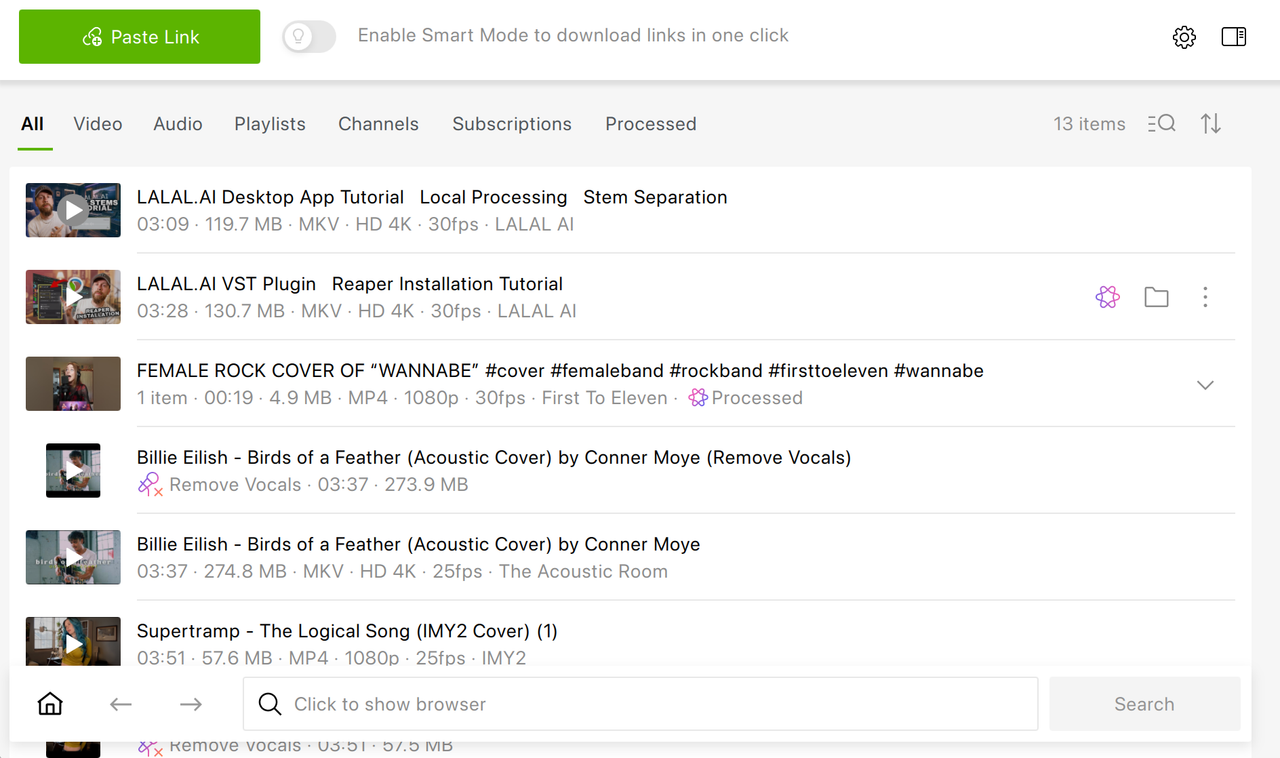
Paste the link. Click Paste Link in the app’s toolbar.
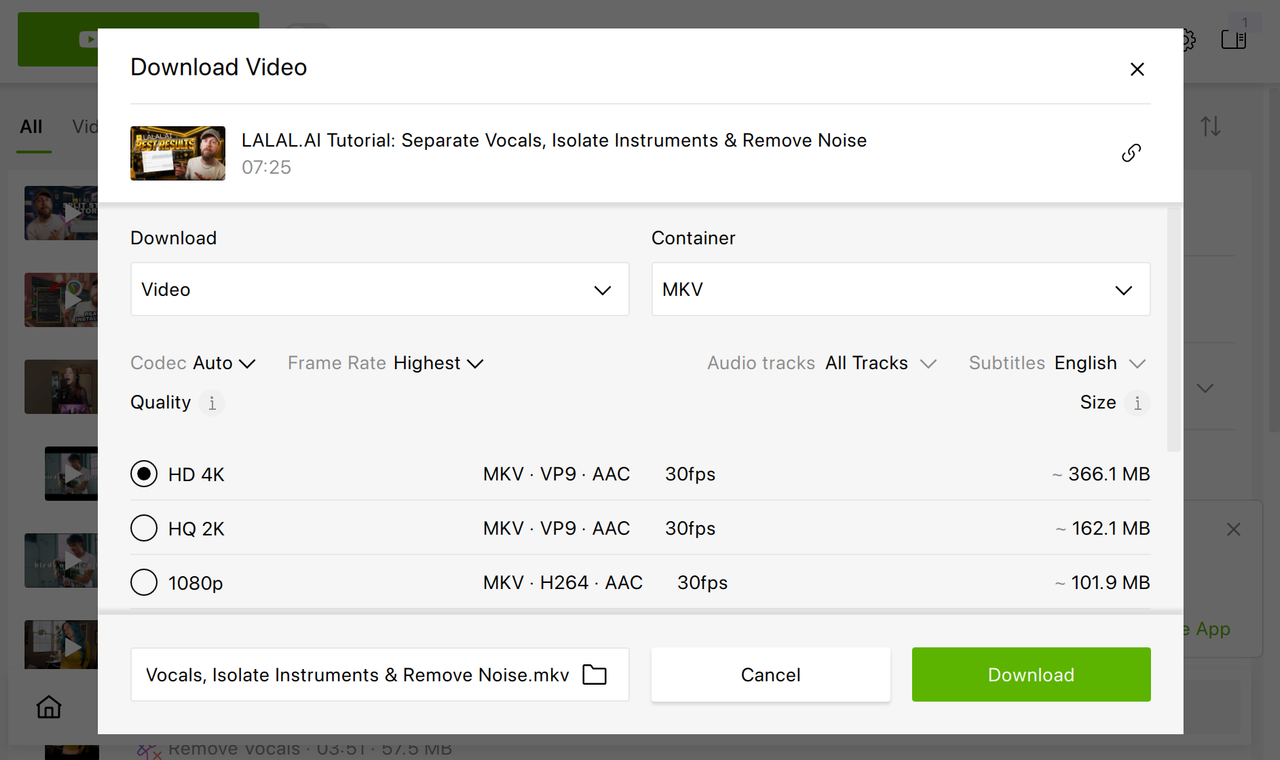
Choose format and quality. Pick MP4 or MKV for video and select the resolution. You can also change the folder where the file will be saved.
Click Download. The file lands on your computer in its original quality, with no watermark added.
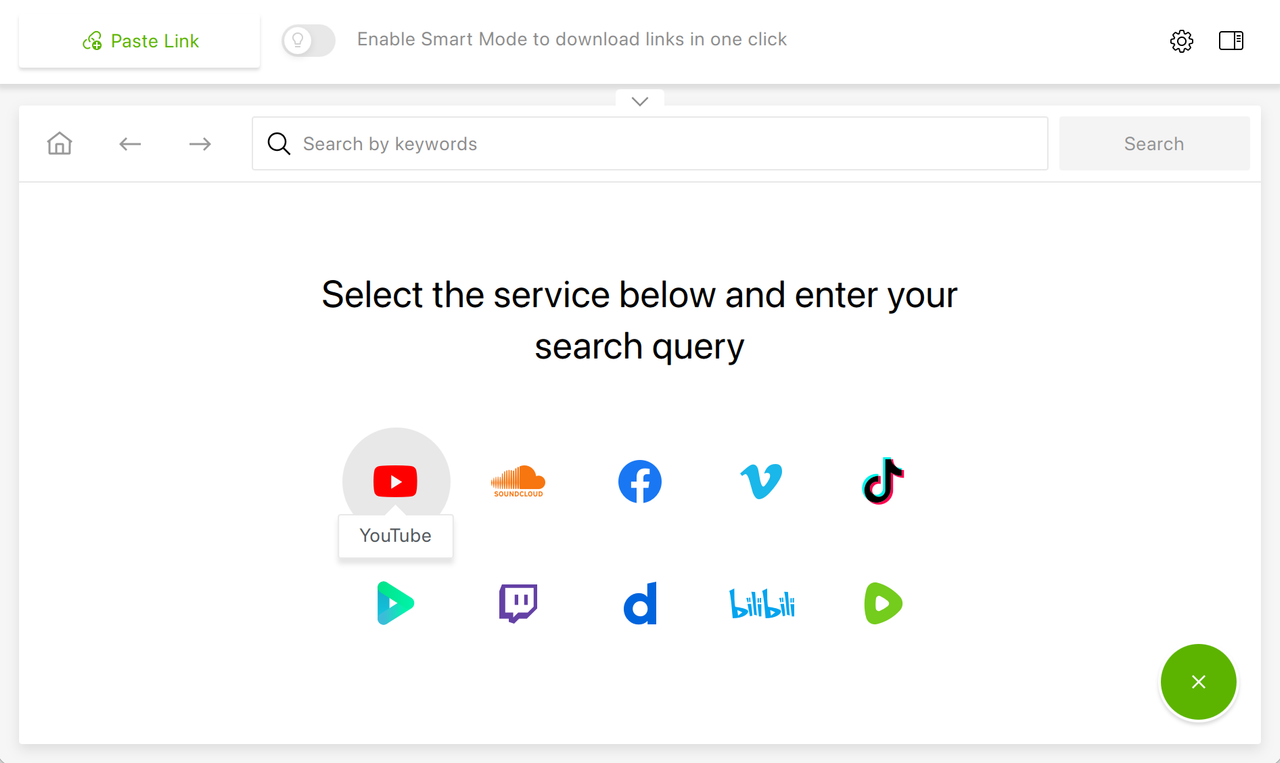
Prefer not to switch between windows? You can also browse YouTube in the app’s built-in browser and download videos right where you find them.
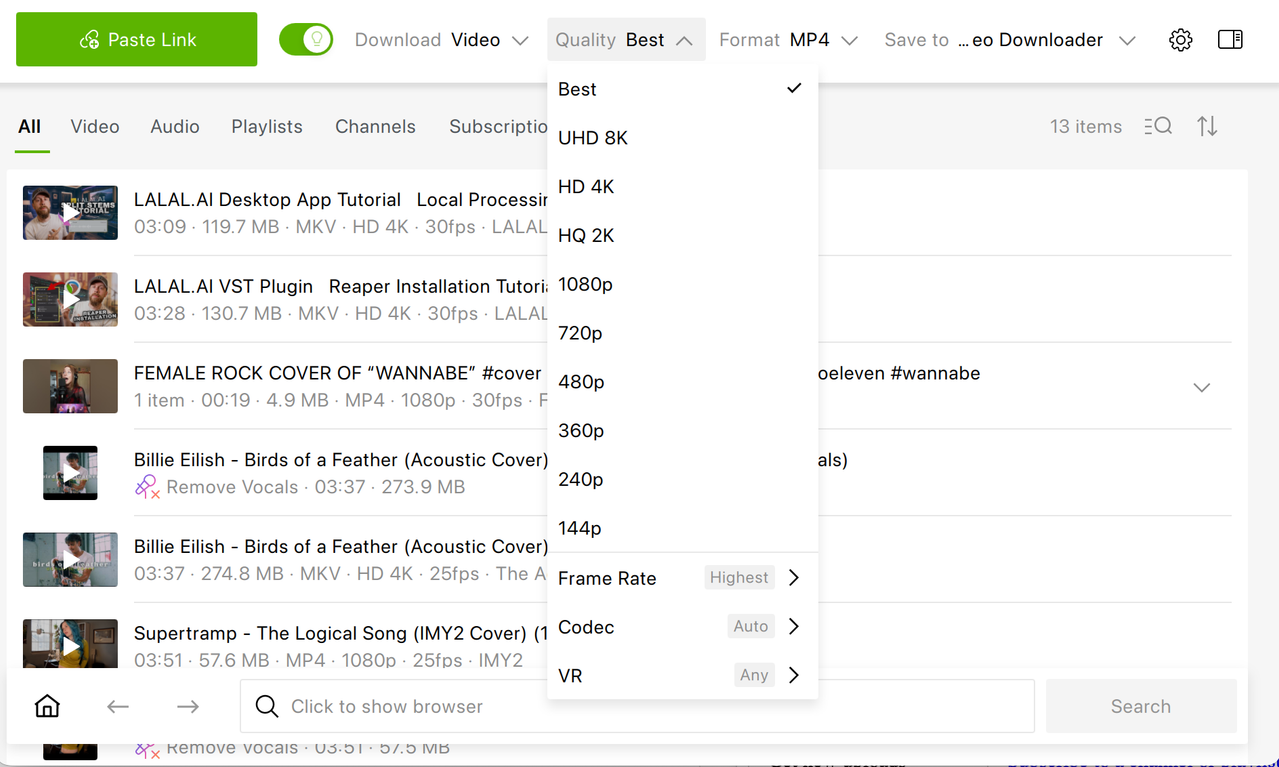
4K Video Downloader Plus allows you to save videos in a few seconds, literally. For this, turn on Smart Mode (bulb icon) and set the preferred download parameters before you paste any video link. Thus, you make sure any new audio or video, be it from YouTube, SoundCloud, Twitch, Vimeo, Dailymotion, Rumble, or other site, is downloaded in the desired format and quality.
Watermark-Free Downloads in Any Quality or Format
The steps above work for every kind of YouTube download. What changes is the option you pick in step 4, and a couple of details worth knowing.
HD YouTube Video Download without a Watermark: 720p or 1080p
For laptops and phones, HD usually hits the sweet spot between sharpness and file size. Select 720p or 1080p in the quality list, and the app saves exactly that stream. Our guide on downloading 720p and 1080p YouTube videos walks through it with screenshots.
In 1440p and Higher
If the original goes beyond Full HD, the higher resolutions show up in the quality list, from 1440p (often called 2K or QHD) up to 8K, and you can save them with 4K Video Downloader Plus as well. Keep in mind that no downloader can add detail the original doesn’t have: a video uploaded in 1080p stays 1080p. For long high-resolution videos, 4K Download recommends the MKV format. Step-by-step instructions are available for 4K (2160p) and 8K downloads, and if the labels in the list puzzle you, our explainer on YouTube video quality clears them up.
Download YouTube Shorts without a Watermark
Shorts download goes exactly like regular videos. Paste the Short’s link (it looks like youtube.com/shorts/…) into 4K Video Downloader Plus and click Download. YouTube doesn’t stamp a watermark on Shorts, so the result is clean unless the logo was already in the clip. That’s more common with Shorts than with long videos, because many of them start life on other short-video apps. Detailed guides cover Shorts on PC and Shorts on Android.
Download YouTube Video without a Watermark as MP3
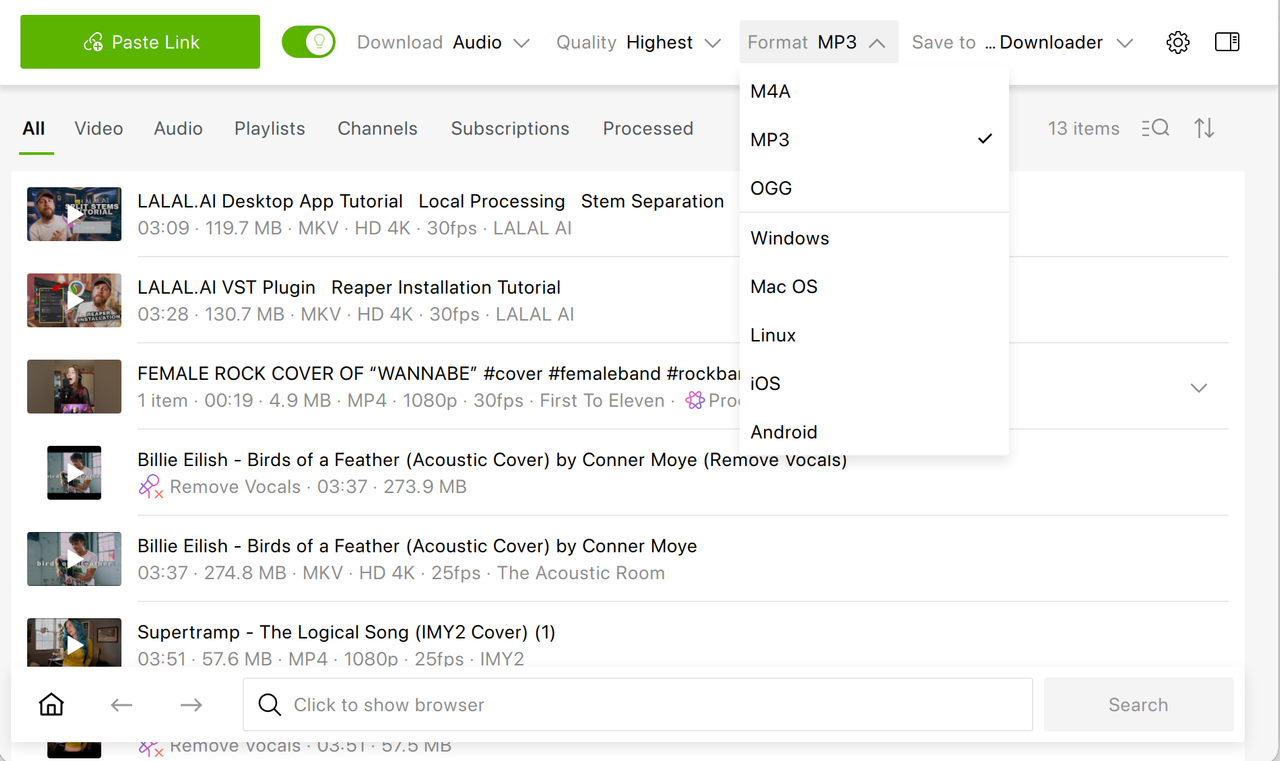
An MP3 holds only sound, so there’s simply no picture for a watermark to appear on. To save just the audio, choose MP3 (or another audio format such as OGG or M4A) instead of a video format in step 4 when downloading with 4K Video Downloader Plus. You can also select the desired bitrate when downloading. If you mostly download music or podcasts, 4K YouTube to MP3 is a dedicated app built for exactly that. Note that YouTube itself doesn’t offer this option: its Help Center states that you can’t download audio or MP3 files from the YouTube app.
Other Ways to Save YouTube Videos without a Watermark
A desktop downloader isn’t the only route. Here’s how the alternatives stack up and where each one falls short.
YouTube Premium Offline Downloads
YouTube Premium members can download videos on the mobile app and in desktop browsers, and the copies carry no extra watermark. The catch is that they aren’t files you can manage. YouTube says downloads are stored encrypted on the device and can be watched only in the YouTube app. They can be played offline for up to 29 days; once that window closes, you must reconnect your device to the internet so YouTube can check your subscription status and verify that the creator hasn't removed or restricted the video.You can’t open them in another player or drop them into a video editor.
YouTube Studio (Your Own Videos Only)
If you’re the creator, YouTube Studio lets you download your uploads as MP4 files in 720p or 360p, depending on the video size, up to five times per video in 24 hours. To grab everything you’ve uploaded at once, YouTube points to Google Takeout instead. Neither option works for other people’s videos.
Online Downloaders
Browser-based download sites are handy when you can’t install anything, but they’re a mixed bag. Free sites are often funded by aggressive advertising (we looked at how that plays out in our SaveFrom article), and the available resolutions depend entirely on the site. If you go this way, check the preview for any extra logo before downloading and close any page that opens unexpectedly.
Here’s how the four methods compare side by side:
| Method | What you get | Quality | Price | Which videos |
|---|---|---|---|---|
| 4K Video Downloader Plus | Regular video (MP4 or MKV) or audio file | Original quality, up to 8K when available | Free Starter version; paid plans from $25 (one-time) or $15/year available | Any public video, playlist, channel, search results; private videos you can access with a paid plan |
| YouTube Premium | Encrypted copy playable only in YouTube | Set in YouTube’s download settings | Monthly subscription | Videos available for offline playback |
| YouTube Studio | MP4 file | 720p or 360p | Free | Only videos you uploaded |
| Online downloaders | Video or audio file | Varies by site | Free, often ad-supported | Varies by site |
If you need a real file in full quality, a desktop downloader is the only option on the list that delivers both. The Starter version of 4K Video Downloader Plus is free forever with limited features, and paid licenses remove the limits and the in-app ads. You can also try every premium feature free for 7 days before deciding.
Can You Remove a Watermark That’s Already in the Video?
Not with a downloader. A burned-in logo is made of the same pixels as the rest of the picture, so any tool that saves the video faithfully will save the logo too. Cropping it out or painting over it with an editing tool alters the creator’s work, and if you plan to publish the result, it can easily cross into copyright infringement. When you need a clean version for a legitimate project, the most reliable route is to contact the creator and ask for the original file or permission to use it.
Frequently Asked Questions
How do I download a YouTube video without a watermark for free?
Use the free Starter version of 4K Video Downloader Plus. Copy the video link, click Paste Link in the app, choose the format and quality, and click Download. The app doesn’t add a logo, and the free version is permanent, with no card required. It does have quantity limits, which paid plans remove.
Can I download a YouTube video in 4K without a watermark?
Yes, as long as the video was uploaded in 4K. In 4K Video Downloader Plus, paste the link and select 2160p (4K) in the quality list. The app saves the stream as YouTube delivers it, without adding any watermark, and 4K and 8K downloads are available in the free version too.
How do I download a 1440p YouTube video without a watermark?
Paste the video link into 4K Video Downloader Plus and choose 1440p (stated as HQ 2K in the app) in the quality options. The option appears only if the creator uploaded the video in 1440p or higher, because no downloader can add resolution that the original doesn’t have.
How do I download YouTube Shorts without a watermark?
Paste the Short’s link into 4K Video Downloader Plus and download it like any other video. YouTube doesn’t stamp a watermark on Shorts. If a Short still shows a logo, it was edited into the clip before upload, which often happens with clips first posted on another app.
Is there an online YouTube downloader without a watermark?
Some online downloaders return a clean file, but quality and safety vary widely from site to site, and a few tools brand their exports. Check the preview for any extra logo before you download. A desktop app such as 4K Video Downloader Plus gives you predictable results without pop-up ads.
Does YouTube Premium add a watermark to downloaded videos?
No, but Premium downloads aren’t regular files either. YouTube stores them encrypted, and they play only in the YouTube app or on youtube.com while you’re signed in, for up to 29 days offline. You can’t move them to another player or edit them.
Why does my downloaded YouTube video still have a logo?
Either the logo is part of the video itself, or the tool you used added it. YouTube’s own channel watermark is a player overlay and doesn’t end up in properly downloaded files. A logo that the creator edited into the footage stays in every copy, and no downloader can remove it.
Published Oct. 14, 2026
 SHARE ON TWITTER


Thanks for feedback
Your comments will appear here shortly. Please spread the word about us in social networks.